Document processing and fraud detection: build or buy?

The 39 difficulties to expect before building your own document processing and fraud detection stack.

Author and Co-Founder at Koncile
By 
Tristan Thommen
Last updated: 
September 30, 2026
 - 
8
 min read

Extracting and structuring document data, enriching it, detecting fraud: with AI, building your own end-to-end solution has never looked so simple. Buying off the shelf still often turns out to be the better option. Here are the thirty-nine difficulties to expect before you start.

Extracting and structuring document data, enriching it, detecting fraud… With AI, building your own end-to-end document processing or fraud detection solution has never looked so simple. That said, buying an off-the-shelf solution often turns out to be the better option. Buying is what guarantees that your solution runs on state-of-the-art technology, handles every error and technical difficulty you will inevitably run into, handles the infrastructure for scaling up, the regulatory and security side…

After many discussions with prospects and customers facing this very question (build or buy), we have put together the complete list of the thirty-nine difficulties you should expect to overcome if you decide to build. Even in the age of AI, where building is easier than ever, building remains more expensive and more difficult than it looks: maintenance, error handling, infrastructure, security… AI is certainly full of promise, and also full of illusions. What follows should help you tell the two apart.

Building has become fast

Before 2025, building an in-house document processing solution took a dedicated team several months. Today, Claude Code or another coding agent lets you build a prototype in a few days: receiving and sorting documents, reading PDFs and images, extracting fields through a language model call, checking the consistency of the data and metadata, verifying the document's authenticity, exposing an API to pass results to the ERP or line-of-business tool in its format, with a way to retry on failure. On 100 test documents the result is good, and a decision maker can legitimately feel that this is the answer: build it in-house.
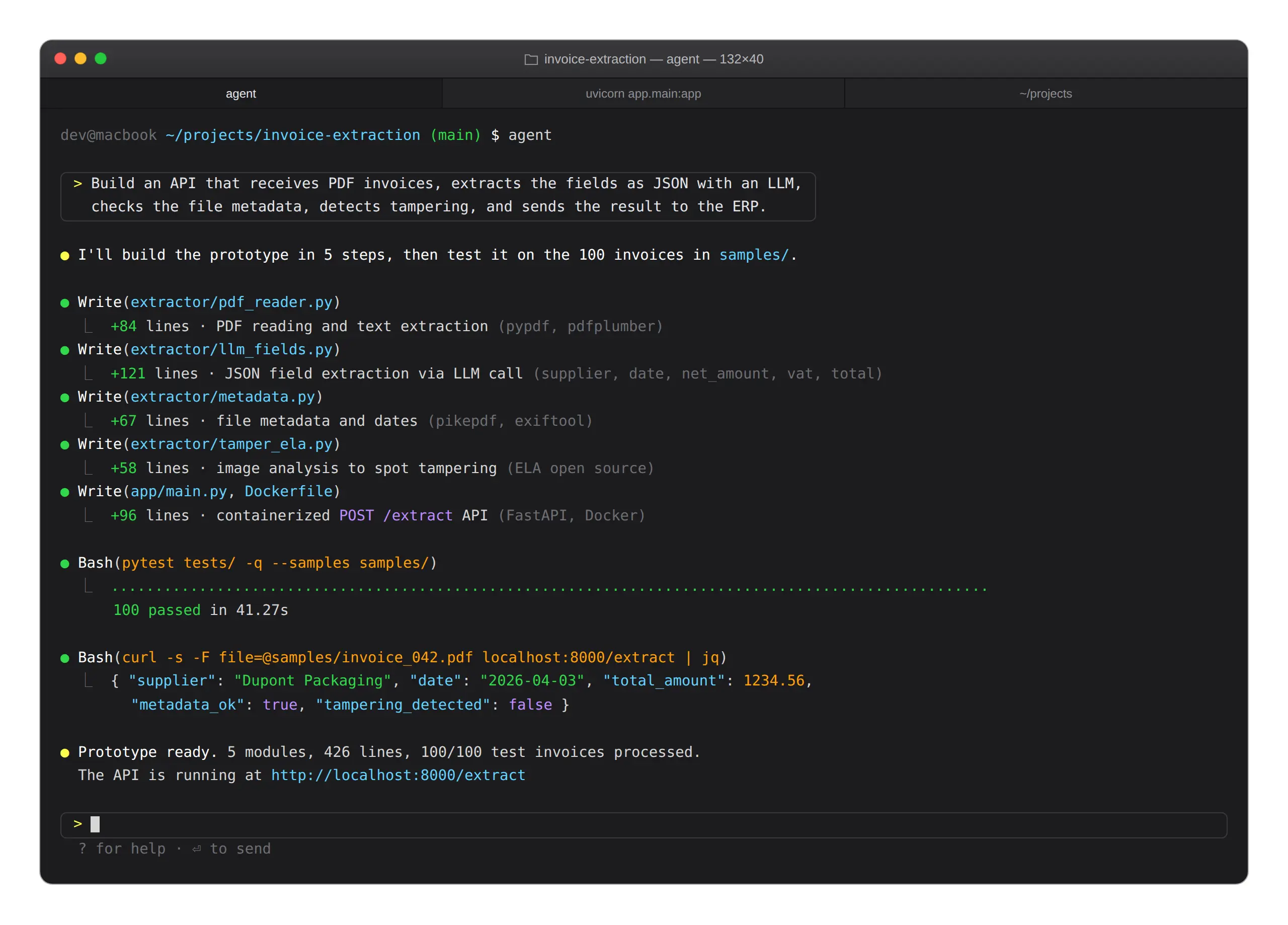
Screenshot of a macOS terminal where an AI coding agent builds a PDF invoice extraction API in 5 modules, successfully tested on 100 documents.

Typically, a coding agent will produce something more or less along these lines:

pypdf, pdfplumber

PDF parsing and text extraction

LLM call

Field extraction into JSON from a prompt

pikepdf, exiftool

File metadata and timestamps

open-source ELA

Image analysis to surface retouching

FastAPI

An API around all of it, containerised

The stack makes sense and the code it produces is clean, so tools of this kind have made that prototyping reachable for small teams, and even for barely technical ones. That is what makes it exciting and motivating. That is what creates the feeling of being able to build everything in-house. And that is also what can become a new risk in the decision.

Thirty-nine difficulties that show up in production

Following many exchanges with teams tempted by building, we have put together a list of thirty-nine challenges and topics that come back regularly and that you should expect to face if you go the build route. No single challenge is insurmountable in itself, but together they add up to an unexpected load that is better anticipated than discovered as production bugs a few weeks in. We have lost count of the times a prospect came back to us a few months after attempting to build, and ended up buying. Precious time lost to the illusion of ease that AI can create, and to how hard it is to anticipate in detail the challenges ahead.
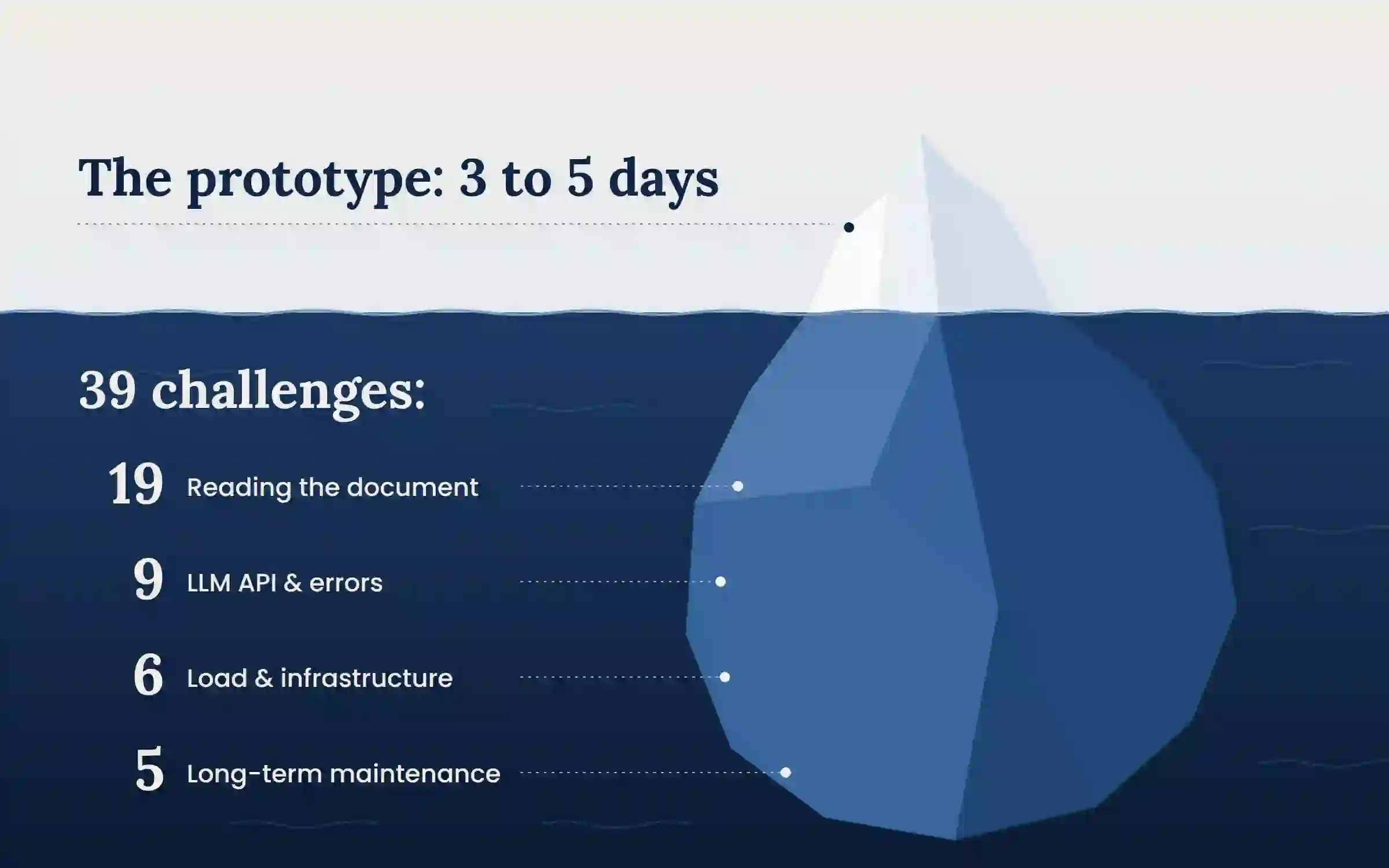
Iceberg illustrating an in-house document processing build: the visible tip is the prototype, built in 3 to 5 days, and the submerged part is the 39 challenges that emerge in production (19 related to reading the document, 9 to the LLM API and errors, 6 to load and infrastructure, 5 to long-term maintenance).

19 challenges tied to reading the document itself

01

A table row straddling two pages, with the repeated header and the page footer wedged into the middle of the row.

02

A ruled table where the value overflows its cell and visually spills into the next column.

03

A table with no rules, where alignment alone marks the end of a column, with one long label that breaks that alignment.

04

Two-level headers, with a merged cell spanning three columns.

05

Handwriting, and the harder case of a note crossing out a printed price and writing another beside it. OCR reads both values. Choosing which one applies is a business rule.

06

Checkboxes, with the distinction between an empty box, a hand-ticked box and a pre-printed cross, possibly crossed out and rewritten beside it.

07

A 40-page bundle holding 12 invoices, with no clear marker of where one ends and the next begins.

08

Every third page rotated by 90 or 180 degrees inside the same file.

09

A stamp or a signature sitting on the amount to be read.

10

Negative amounts written (1,234.56), -1,234.56, or 1,234.56- with a trailing sign, as some ERP exports do.

11

Mixed decimal separators: 1,234.56 and 1.234,56 in the same batch, when suppliers sit in different countries.

12

Ambiguous dates: 03/04/2026 can mean 3 April or 4 March. The answer depends on the issuer and is not in the file.

13

Units that do not compare: “12 x 75cl” and “9L” are the same quantity on two different rows. Let alone product packaging (cases, bottles, bags and so on), which tends to distort the quantities and prices to be extracted.

14

The same product under four labels across three suppliers, with an EAN code present about half the time.

15

Character confusions between 0 and O, 1 and l, 5 and S, rn and m. Visible in a label, invisible in a product reference.

16

A text layer that contradicts the image, on a badly OCRed scan as much as on a doctored document.

17

Unembedded fonts, which extract as unreadable text while the document displays correctly.

18

A phone photo, with its perspective, cast shadow and flash glare on glossy paper.

19

Unexpected formats: multipage TIFF, iPhone HEIC, .msg with nested attachments, a password-protected archive.

Splitting a bundle of documents and reading handwriting are subjects in their own right. Each of the other points is a challenge you will only take on once you meet the error, in production.

9 challenges tied to the language model API and error handling

01

Rate limits with variable retry windows, and the wave of retries that follows a large batch.

02

Timeouts on long documents, with nothing to indicate whether the work is lost or still running.

03

Malformed JSON: truncated mid-object, with a trailing comma, or wrapped in a code fence.

04

An invented value for a field absent from the document. The answer is well formed and plausible, so nothing flags the error.

05

A policy refusal on a document containing an identity paper, for instance.

06

A context window exceeded on a bundle of several hundred pages, which forces chunking with overlap and then reassembly.

07

Two runs giving two different results on the same document, which complicates reconciliation and audit.

08

A provider outage, raising the question of a second backup provider with a different prompt format and quality to recalibrate.

09

No per-field confidence score, which forces reviewing every document, or none.

6 challenges tied to scaling and infrastructure

01

Very uneven load, for example tens of thousands of pages on a Monday morning and almost nothing the next day.

02

The same file sent several times by several people, which calls for duplicate detection on actual content rather than on the filename alone.

03

A document stuck in processing, with the question of who notices and after how long.

04

Partial error recovery: out of a batch of several thousand files a few dozen fail, and only those need replaying.

05

Unexpected documents in the flow: a read receipt, a signature image as an attachment, a document of another type slipped into the batch.

06

Storage, retention and deletion on request, with the log trail of who saw what.

5 challenges tied to long-term maintenance

01

A new model ships every 2 or 3 months. It is better on some documents and worse on others, and knowing which requires an annotated reference set and a benchmark harness to stay current.

02

A model version is retired while the prompt was tuned to it, which forces a full recalibration.

03

Without a reference set, no regression testing is possible. The effect of a prompt change stays unknown until a user reports a problem.

04

Improving the engine raises the question of history: whether to reprocess past documents, whether the originals were kept, and which version produced which value.

05

A dependency on engineering teams to configure new use cases, and therefore necessarily longer deployment cycles. Unless you also build a visual, plain-language interface so that non-technical business users can configure a new use case quickly on their own.

Taken in isolation, each of these challenges can be resolved in a few hours. Taken together, they interact and turn a project meant to be quick and efficient into a sprawling machine that is expensive to build, maintain and secure. Worth knowing before starting.

The maintenance never stops

A document processing tool has to be maintained. Models change every few months, issuers change their formats without notice, security requirements evolve, customer expectations shift. An in-house project therefore commits a permanent load that goes well beyond the initial build.

That load is the least visible at the moment of decision, and the most painful. Especially when it is discovered after the fact. It covers several distinct pieces:

  • Following available models, evaluating them on your own documents, and trading off quality, cost and latency.
  • Maintaining an annotated reference set, without which no improvement can be measured.
  • Absorbing issuer format changes, which come without warning.
  • Holding security and compliance, often now a condition for signing a customer.
  • Staying available for incidents, including during holidays and busy periods.

This work has no end. It durably occupies part of a team, on a subject that is almost never the organisation's own business.

Verifying that the document is genuine

Forged documents are more and more frequent, and fraudsters more and more clever. How do you make sure that a loan application or an insurance claim file is genuine? In this area, building becomes close to impossible: image and pixel analysis, metadata study and hundreds of highly specific business rules, comparison against internal databases of reference documents, fine-grained consistency analysis of the document, comparison against data pulled from external databases.

A language model understands perfectly well that it is looking at a payslip and returns the net pay. It does not measure compression differences between two areas of an image, it does not compare the tool declared in the metadata against what a given issuer usually produces, and it does not spot an object layer added to the file after issuance. And all of this has to be done business by business, document type by document type, use case by use case. Good luck.

What language models critically lack is the basis for comparison and the fine-grained domain knowledge: knowing what a given issuer normally produces requires having observed a large number of their genuine documents. The hidden signals of document fraud and the three detection methods cover that mechanism in detail.

When building is still the right decision

So when should you build? Building still makes sense in several situations. Here are the four questions to ask in order to decide:

  1. Where do the documents come from? Produced in-house, the format is controlled and the problem stays manageable. Received from third parties, heterogeneity and security become the critical subjects.
  2. What has to be done with them after reading? If the point is to feed an internal dashboard, the risk stays low. But if a payment has to be triggered, a contract granted or a file rejected, then even with good reliability there is a considerable inherent risk that is hard to control with a home-made solution.
  3. How often do formats change? A stable format is handled by a one-off development. A format that moves every quarter means non-developers have to be able to keep up.
  4. Is document processing part of the business? If it is the product being sold, it gets built. Otherwise it competes with the rest of the engineering roadmap.

Building holds up when

  • The document is produced in-house, highly structured and stable.
  • Volume is low and predictable, on a single format.
  • The data feeds a use with no checking at stake.
  • Document processing is part of the product being sold.

Buying holds up when

  • Documents come from third parties whose format is not controlled.
  • The data triggers a decision that commits the organisation.
  • Formats change often and business users need to keep up.
  • Security and compliance are asked for by customers.
  • The engineering team has other priorities.

The shortest route to a view is testing on your own documents, picking the hardest ones rather than the most legible.

Test on your documents

Frequently asked questions
Should you build or buy document processing?

Building has become fast, a prototype takes a few days. The comparison turns on what comes next: 39 difficulties that show up in production, reconciling values against other sources, authenticity checking and permanent upkeep. Building still makes sense on a document produced in-house, stable, at low volume and with no checking at stake.

Can you build a document extractor with a coding agent?

Yes, a working prototype takes 3 to 5 days. It reads the PDF, extracts fields through a language model call, checks metadata and exposes an API. The challenges arrive beyond prototyping, on a production deployment with volume, format heterogeneity, external dependencies, maintenance, and infrastructure and data security topics.

Why does a document processing project take longer than planned?

Because the initial estimate covers reading the document, while the real load comes from variety, volume and reconciliation. Dozens of challenges come back regularly in production. Each is resolved in a few hours; taken together they interact and generate a complexity and a difficulty that decision makers often underestimate.

Is 85 percent accuracy good enough?

It depends on the use case. Where reliability has to approach 100 percent, language models are often poorly equipped and you need a specialised solution that blends computer vision and language models with continuous tuning. If a rate around 85 percent is enough and the error is tolerable, then a home-made build on LLMs is workable.

What is the difference between OCR and intelligent document processing?

OCR converts an image into text. Intelligent document processing identifies the document type, splits bundles, extracts predefined fields, reconciles data, returns a confidence score per value, checks the consistency of the whole and detects document fraud.

Can a language model really verify that a document is genuine?

No. A language model reads the meaning of the document. Authenticity checking rests on 3 different specialised layers: image analysis, dedicated and trained examination of the file metadata, and consistency of the values against each other.

What costs the most in in-house document processing?

Maintenance and tuning over time, rather than the initial build. Models change every 2 or 3 months, issuers modify their formats without notice, customers want to configure new use cases, and security requirements tighten. This work durably occupies part of a team on a subject that is generally not the organisation's core business.

When is building still the right decision?

When the document is produced in-house, highly structured and stable, a dedicated development gives better results than a general engine. When volume is low and predictable, on a single format, and the data does not trigger a committing decision. And when document processing is part of the product the organisation sells.

Sources

  1. Expert observations from running a document processing and fraud detection platform: Koncile.

The agents that automate your documents
Get ahead on automation. See how Koncile can simplify your operations.
Discover Koncile
Discover Koncile
Our latest ARTICLES

Real life insights on document automation

All our ressources
All our ressources
Document processing and fraud detection: build or buy?
FEATURE

Document processing and fraud detection: build or buy?

Extracting and structuring document data, enriching it, detecting fraud: with AI, building your own end-to-end solution has never looked so simple. Buying off the shelf still often turns out to be the better option. Here are the thirty-nine difficulties to expect before you start.

Read the article
Top Healthcare OCR Tools: HIPAA Compliance and What the Clinical Evidence Shows
FEATURE

Top Healthcare OCR Tools: HIPAA Compliance and What the Clinical Evidence Shows

Amazon Textract has been formally HIPAA-eligible since October 2019. Most healthcare OCR comparisons never mention that, or check which of the other four tools on their list actually offer a signed BAA. Here is a rebuild that checks compliance status directly, and looks at what the real clinical trials on ambient AI scribes actually found, not just what the marketing claims.
Read the article
Best Accounting Software for Sole Proprietors and Freelancers in 2026
FEATURE

Best Accounting Software for Sole Proprietors and Freelancers in 2026

A freelancer sending a dozen invoices a month can blow through Xero's cheapest plan by week three, and a $19-a-month FreshBooks account caps out at five clients. The number on a pricing page is rarely the number you actually pay. Here is a real comparison of QuickBooks, Xero, Wave, and FreshBooks built for a business of one, not a growing team.

Read the article
Hebrew OCR: what works on real business documents
Analysis

Hebrew OCR: what works on real business documents

Most OCR vendors say they support Hebrew. Far fewer support Hebrew handwriting, and none of them tells you that 91% character accuracy can mean one word in two is wrong.

Read the article
Why Do OCR & Machine Translation Fail Without AI?
FEATURE

Why Do OCR & Machine Translation Fail Without AI?

Japanese combines three writing systems on one page and should be a hard case for OCR. Benchmark research found the opposite: Japanese accuracy exceeds Latin script. Arabic and Hebrew are where things genuinely go wrong, for specific, documented reasons. Here is what real research shows about why scripts fail differently, and what actually stops the errors before translation compounds them.

Read the article