Automatically categorize your documents
Why categorize documents automatically?
Manual document sorting can represent between 30% and 50% of the total time spent on document processing within organizations.
Each employee must open files one by one, identify their nature (invoice, quote, contract, purchase order), and then send them to the right department or workflow.
A logistics operator in France using Koncile reported that manually opening each transport provider’s documents could take 2 to 3 hours per day per operator, with a significant error rate.
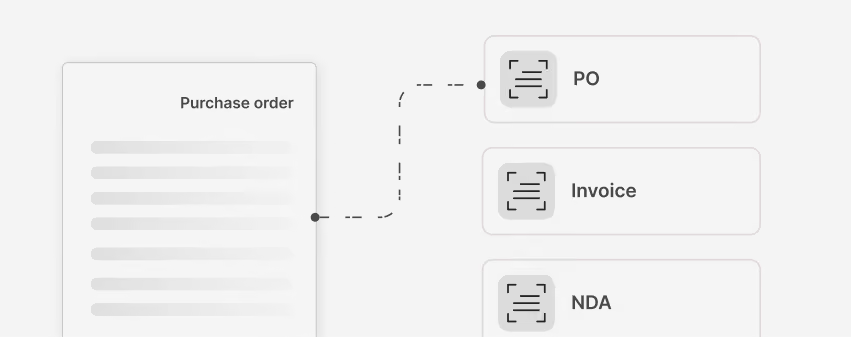
AI classification can help you in many ways
Koncile offers an automatic document categorization feature.
Whether you import a document manually or send it through the API, the tool identifies the document’s nature based on the templates you have configured in the platform.
Let’s take a simple example:
You receive invoices and purchase orders, but the files are not named correctly. You need to open each one to understand what it is, and only then extract the specific information related to that invoice or purchase order.
With automatic classification, each document is recognized before you even open it.
And with the extraction engine, you can choose exactly which fields you want to capture for each type of document.
How AI categorization works (technical)
Koncile categorization is based on a lightweight yet extremely effective pipeline.
- Transformation of image content into text
If the document contains no text (scan, photo, image), Koncile automatically applies an advanced OCR engine to retrieve all usable content. If it already contains text (native PDF, Word, email), OCR is skipped.
- LLM-based analysis
Once the text is available, Koncile uses a specialized LLM to understand the nature of the document and assign it to the correct category: invoice, purchase order, quote, contract, bank statement, certificate, etc.
- Incorporating user instructions
For more complex cases, Koncile relies on user-provided instructions to go further in the classification.
Examples: distinguishing invoices by supplier or customer, sorting delivery notes based on business criteria, or segmenting similar documents coming from different entities.
These custom rules act as hints for the model, which automatically adjusts the classification to match the real business context.
- Reliable and adjustable results
Thanks to this combination of OCR + LLM + business rules, Koncile correctly identifies almost all documents on the first pass while allowing fine-grained classification when needed.
Concrete use cases
Here are common use cases seen with Koncile customers:
Accounting & Finance
Accounting teams automatically sort documents received from suppliers (invoices, expense receipts, credit notes, bank statements). Specific data is extracted for each type: amounts, VAT, due dates, line items, unit prices. Mandatory fields are checked for compliance.
HR
HR teams automate sorting of onboarding documents (identity documents, degrees, bank info, certificates). Employee documents (contracts, amendments, payslips, attestations) are automatically categorized into the digital file. Expense reports are recognized by type (restaurant, hotel, transport) with automatic extraction.
Procurement & Supply Chain
Purchasing teams automatically sort the entire procurement cycle: purchase requests, supplier quotes, purchase orders, delivery notes, invoices. Logistics teams organize CMRs, bills of lading, customs documents, and certificates of origin. Quality documentation (certificates, attestations, audits) is collected and updated with no manual effort.
Healthcare
Healthcare organizations automatically sort patient documents: prescriptions, test results, reports, imaging, medical certificates. Reimbursement requests are processed using automatic recognition of care forms. Regulatory health documents (vaccination certificates, aptitude documents, mandatory checkups) are identified and sorted.
Real Estate & Rentals
Agencies and property managers automatically sort tenant applications: ID documents, income proofs, rent receipts, attestations. All rental documents (leases, inspection reports, diagnostics) are categorized by property. Sale-related documents (forms, diagnostics, notarial documents) are tracked and organized.
Type: Automation
User: Business
Complexity: Medium
Automate document processing at scale

All your questions about smart classification

Discover how to optimize your document workflow with Koncile’s artificial intelligence
Koncile is a document extraction and automation tool. It transforms invoices, quotes, reports, purchase orders, identity documents, prescriptions, contracts, and more into usable data — either in Excel format or directly injected into your systems.
Koncile automatically recognizes more than 150 types of professional documents with an accuracy of 95–99%. The system identifies the nature of each document by analyzing its structure, content, and visual elements.
Supported document types :
Finance & Accounting : supplier/client invoices, quotes, purchase orders, credit notes, expense reports, receipts, bank statements, bank details (RIB), checks
HR & Payroll : employment contracts (permanent/temporary/agency), payslips, employer certificates, work certificates, proof of address
Identity : ID cards, passports, driver’s licenses, health insurance cards, company registration certificates (Kbis), criminal record extracts
Logistics : delivery notes, CMR consignment letters, tracking slips, transport receipts, manifests
Legal & Real Estate : contracts, leases, sales agreements, notarial deeds, non-disclosure agreements (NDA), real estate diagnostics (DPE)
Healthcare : prescriptions, test results, medical certificates, treatment forms, insurance claim forms (CPAM)
Technical : plans, specifications, intervention reports, certificates of conformity, quality documents (ISO)
Recognition accuracy : structured documents (invoices, quotes): 98–99%. Semi-structured documents (contracts): 95–97%. Handwritten documents: 90–93%.
Customization : Koncile learns your specific documents in just a few minutes. Provide 10–20 examples of your internal forms or proprietary reports, and the system automatically creates the new category.
All supported formats : PDF, JPG, PNG, TIFF, HEIC, high-resolution scans or smartphone photos, multi-page documents, handwritten or annotated files.
Koncile achieves more than 99% accuracy on structured documents (invoices, quotes, purchase orders).If a document cannot be categorized, it appears in the Alerts section, where an operator can assign it manually.
You can create your own document categories in Koncile to route each file to the correct process. Categories correspond to document templates, and you can create as many as needed.
The document will be placed in the Alerts category, accessible from the navigation menu.A user can then manually assign the correct category — this is Koncile’s built-in “human in the loop” flow.
Document quality can affect how accurately it is routed to the correct template.If the document cannot be categorized, it will be redirected to Alerts.
Absolutely. The categorization is fully multilingual.Koncile can recognize documents in multiple languages and route them to the correct template.


