
Koncile vs ABBYY FineReader: 2026 Comparison
Looking at ABBYY FineReader but need more than PDF editing? We compare FineReader and Koncile on OCR accuracy, automation, pricing, and which one actually fits your workflow.



Koncile is an AI-powered platform that extracts structured data from 100+ document types and pushes it into your existing tools via API.
About Koncile
Koncile is built specifically for structured data extraction and reconciliation: extract fields from any document, validate them, and connect results to your stack. ABBYY FineReader alternatives are worth comparing — this article breaks down both tools honestly.
Key pros of Koncile
- No-code custom field extraction, no templates required
- Per-field confidence scoring before pushing data downstream
- Built-in fraud detection system and duplicate invoice checking
- SOC2 certified, GDPR-compliant, EU data hosting
- Free trial: 20 credits, no credit card
- 100+ document types: invoices, IDs, bank statements, contracts, logistics docs
Key issues of Koncile
Koncile is focused on cloud-based structured extraction and automation rather than desktop PDF editing. Teams needing a local desktop tool to edit, annotate, and compare PDF documents will find FineReader a more complete fit for that specific use case.
ABBYY FineReader is a desktop OCR and PDF editing tool with 30+ years on the market, known for high accuracy across 190+ languages.
About ABBYY FineReader
ABBYY FineReader is one of the most recognized names in OCR software, with 30+ years on the market and consistently strong reviews on G2 and Capterra. If you have been searching for OCR or document processing tools, it's probably come up.
Key pros of ABBYY FineReader
- 99%+ OCR accuracy across 190+ languages
- Strong PDF editing: annotate, redact, compare document versions
- 30+ years on the market, widely trusted
- One-time perpetual license available, no mandatory subscription
- Standard at $99-117/user/year; Corporate at $165/user/year
- Used by PwC, Skoda Auto, and major enterprises worldwide
Key issues of ABBYY FineReader
FineReader is desktop software with no cloud-based document automation, no workflow builder, and no structured field-level extraction. API access requires FineReader Server, a separate enterprise product. There is no built-in accounting OCR automation or fraud detection layer.
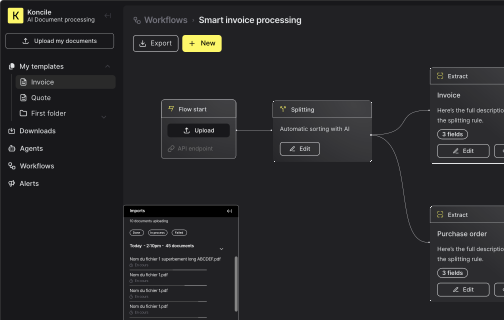
How does each tool look like?
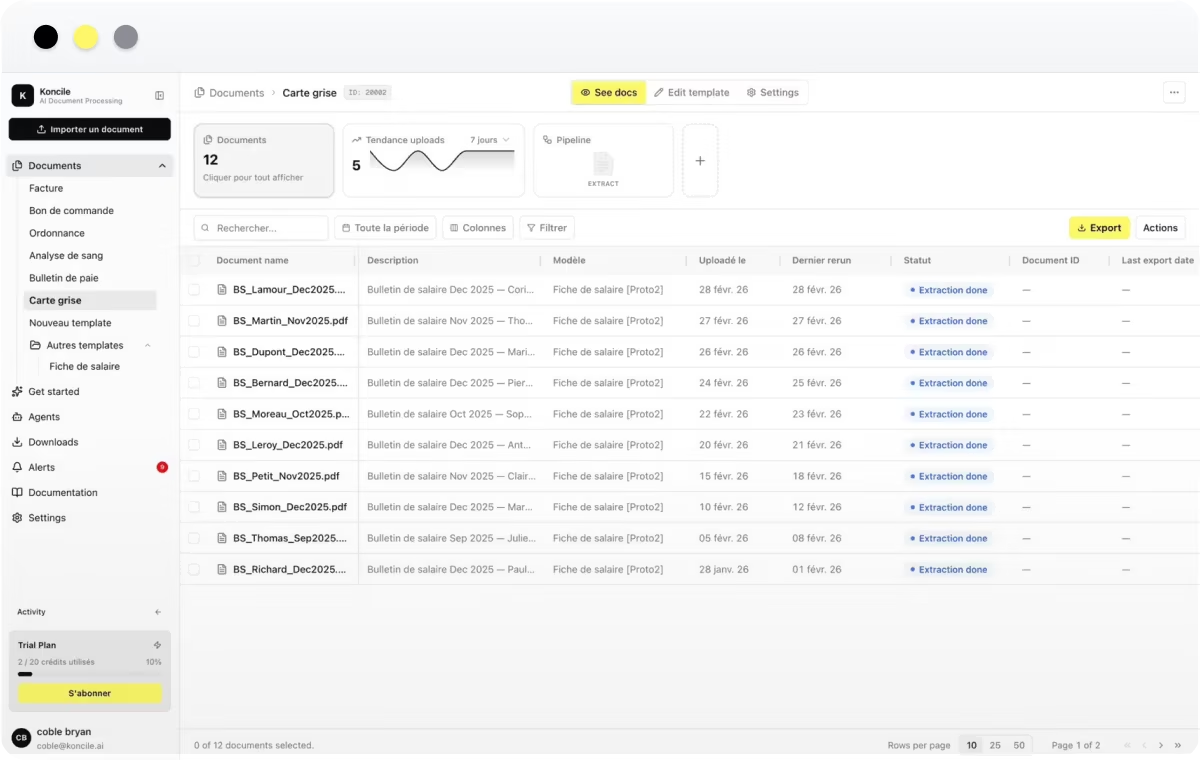
General dashboard

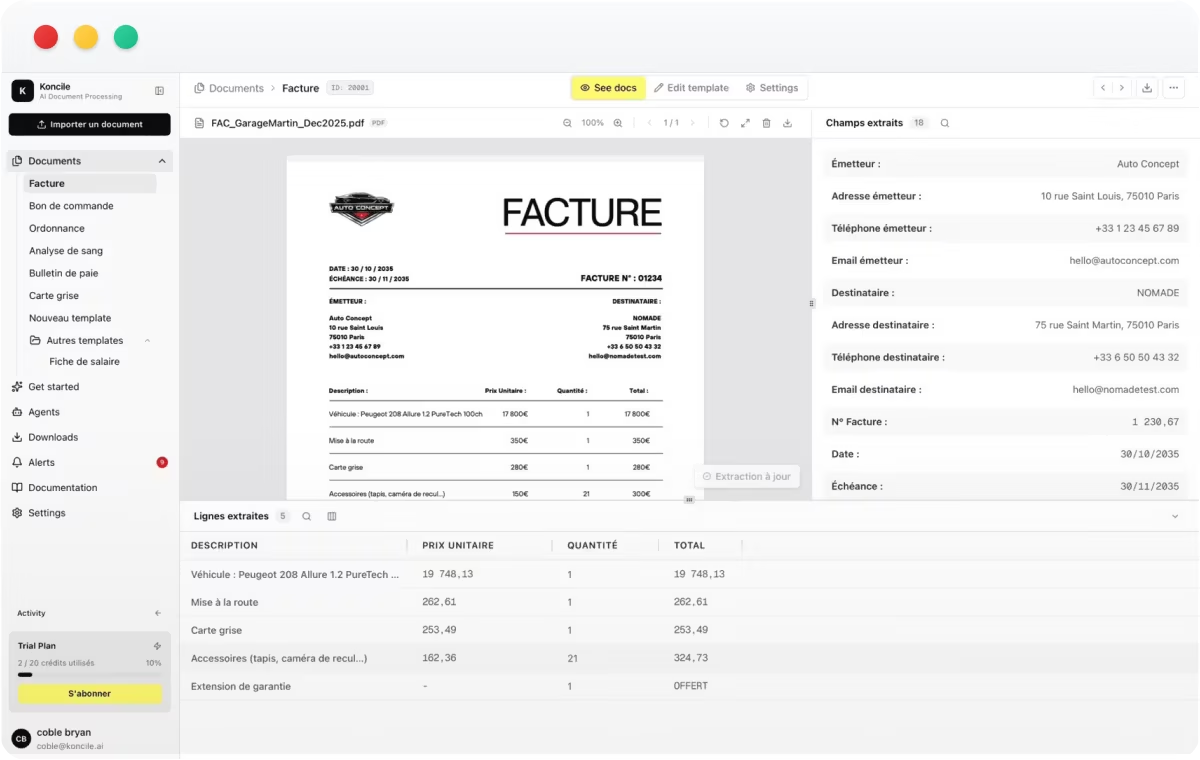
Detailed extraction page

Here's what differs between the two
| Features | Koncile | ABBYY |
|---|---|---|
Setup time | 48h | 4-8 weeks |
Custom fields | Yes, no-code | Requires training |
Fraud detection | Built-in | Add-on |
API-first | Yes | Partial |
Table extraction | Yes | Yes |
Handwriting recognition | Yes | Yes |
SOC 2 certification | Yes | Not publicly stated |
Pricing model | Per page | Per license |
Pricing Details
| Features | Koncile | ABBYY |
|---|---|---|
Pricing published | Yes | Yes |
Starting price | €129 / month (500 pages) | $99–117 / user / year |
Price per page (est.) | ~€0.26 / page (Starter) | ~$0.08–0.10 / page |
Free trial | 20 credits – no credit card | Yes |

Trusted by product teams and regulated organizations






Which OCR works best for you?
Designed for SaaS platforms, ERP systems and document-heavy operations that require precision, scalability and control.
Both tools solve real document processing problems, but for different workflows.
Choose Koncile if your company processes invoices, ID documents, bank statements, contracts, or logistics documents and needs structured data extracted, validated, and routed automatically. The duplicate invoice detection, per-field confidence scoring, and document fraud detection make it the stronger fit for finance and compliance teams.
ABBYY FineReader is the stronger choice if your main need is reliable desktop OCR and PDF editing: converting scanned documents, editing text in PDFs, and comparing document versions.
For companies looking to automate document data extraction at scale, Koncile is the stronger long-term investment.
Koncile vs Other Alternatives


Compare more OCR tools

Ready to choose the right OCR solution?
Get started in minutes. No complex setup, no commitment.
All your
questions
Need more help? Contact us at contact@koncile.ai, check out our documentation, or book a demo.
Is ABBYY FineReader the same as ABBYY Vantage?
No. FineReader PDF is desktop software for editing and converting PDFs. Vantage is a separate enterprise cloud platform for large-scale document processing automation. They share the ABBYY brand but are different products with different pricing, architecture, and target users.
What is the ABBYY FineReader price in 2026?
FineReader Standard costs approximately $99-117 per user per year on subscription. The Corporate plan is around $165/user/year. Enterprise and FineReader Server pricing requires contacting ABBYY directly.
Can ABBYY FineReader extract data to Excel or CSV?
Yes, FineReader can convert documents into Excel format but it converts the document layout, not specific extracted fields. For structured field-level extraction with confidence scoring, a dedicated tool like Koncile is more appropriate.
Does ABBYY FineReader have an API?
FineReader PDF's desktop product does not expose a developer API natively. API access requires FineReader Server, a separate enterprise product. Koncile is built API-first with MCP server integration.
What is a good ABBYY FineReader alternative for document automation?
Koncile is a direct alternative for structured data extraction and workflow automation, with transparent per-page pricing and a free trial at koncile.ai with 20 credits and no credit card required.