
AI-Powered OCR vs Traditional OCR: What Really Changes for Your Documents
Traditional OCR, general-purpose AI vision, and purpose-built LLM OCR compared on real data, not vendor claims.
.avif)
One benchmark found Gemini 1.5 Pro's accuracy on finance documents drops to around 50%, while GPT-4o hits 84% on legal content in the same test. That is the gap most switch-to-AI-OCR advice skips. Here is a grounded comparison of traditional OCR, general-purpose AI vision, and purpose-built AI OCR, with a practical migration path.
While having the same category of model and same task but a 34-point difference in accuracy is huge between Gemini 1.5 Pro and GPT-4o. That accuracy gap is the part most "switch to AI OCR" pitches leave out. General-purpose vision models are genuinely better than classic OCR at understanding a document rather than just reading it, but "better" is not uniform, and finance and compliance documents, the ones most business are actually trying to automate, are not where these models are strongest by default.
This is not an argument against AI OCR. It is an argument for being precise about which kind you are getting. There are three distinct things people mean when they say "AI OCR," and confusing them is where migrations go wrong. For the deeper explanation of the underlying mechanism, how an LLM understands document context instead of just transcribing it, see our companion piece on why LLM OCR outperforms classic OCR. This article is about the practical side: what changes, what doesn't, where the risk actually sits, and how to move without breaking a workflow that currently works well enough.
Three things people call "AI OCR," and they are not the same product
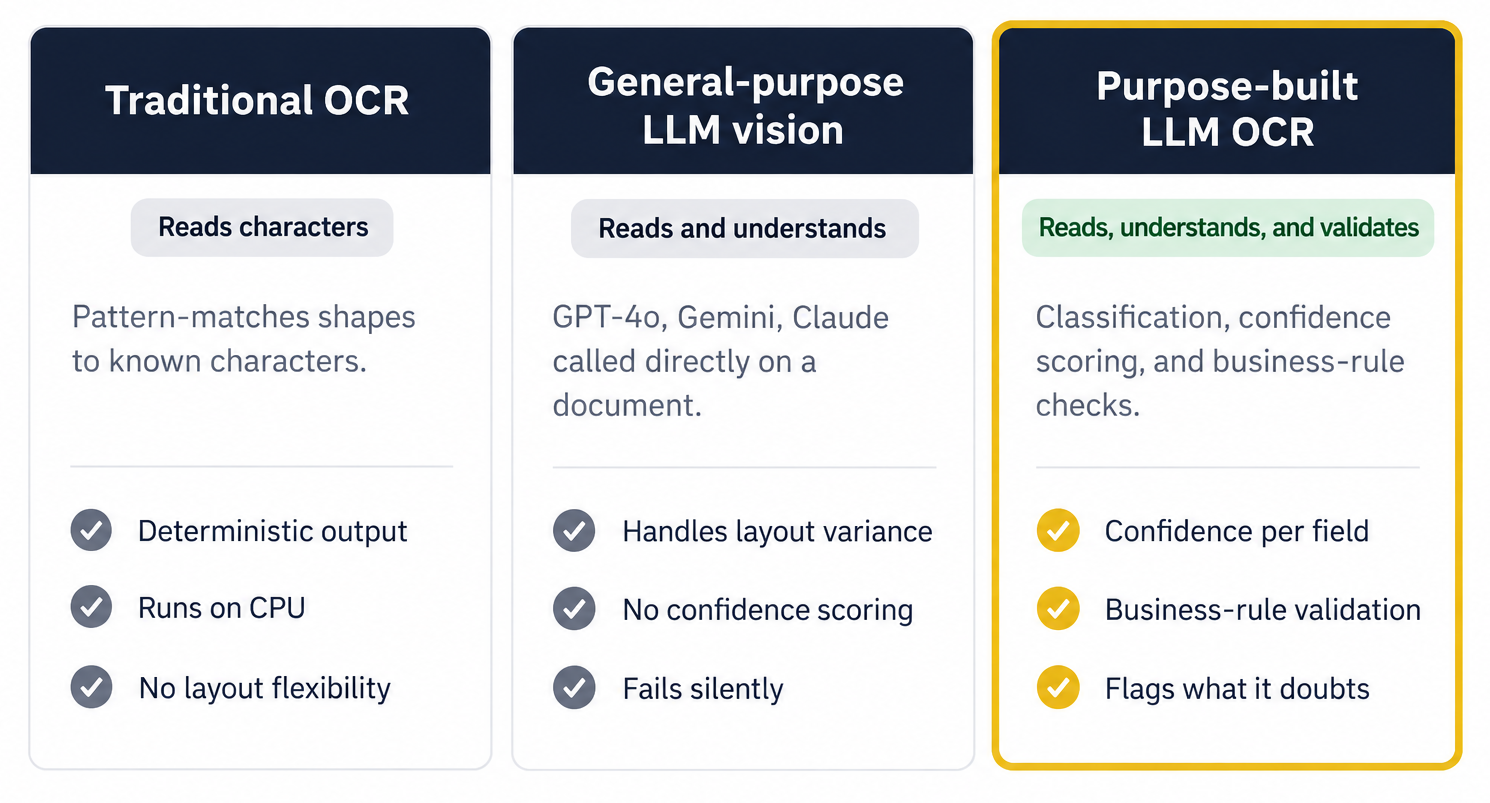
1. Traditional OCR reads characters. Tesseract, ABBYY's engine, most scanner software. It converts pixels into text using pattern matching against known character shapes, then hands the raw text to whatever script or human decides what it means. Fast, cheap, runs on a CPU, completely deterministic: the same input produces the same output every time.
2. A general-purpose vision LLM is OpenAI's GPT-4o, Google's Gemini, or Anthropic's Claude, called directly on a document image or PDF. This is what most people mean when they say "just use ChatGPT for OCR" or search for OpenAI OCR specifically, and it is also an OCR API in the loosest sense of the term. It reads the document and understands it, in the sense that it can answer "what's the total on this invoice" rather than just returning every character it sees. It is not built for this task specifically, and its accuracy varies by document domain in ways that are easy to miss until you hit one.
3. A purpose-built LLM OCR pipeline also uses a language model to read and understand the document, but wraps it in validation logic designed for the job: confidence scoring per field, business-rule checks (does this total actually add up), classification before extraction, and an audit trail back to the source. This is the category Koncile sits in, along with a handful of other vendors built specifically for document extraction rather than general conversation.
The confusion between the second and third category is where most of the disappointment happens. A general-purpose model can extract a number confidently and be wrong, with nothing in its output flagging that the number needs a second look. A purpose-built pipeline is designed to catch exactly that case.
Where traditional OCR is still the right answer
It's worth saying plainly: classic OCR has not stopped working. On a clean, high-quality scan of standard printed text, character-level accuracy for good traditional engines sits in the 95 to 98 percent range, and it gets there without a GPU, without an API call to a model provider, and without any variance between runs. If your documents are genuinely simple and consistent, template-based OCR is cheaper to run and easier to audit than anything AI-based, precisely because it does less.
The honest reason organizations move away from it is not that it got worse. It's that document volume and variety grew past what a rules-based system was built to handle, and the maintenance cost of chasing every new layout eventually exceeds the cost of the tool itself.
Where it actually breaks, and why the failure looks different with AI
Traditional OCR and AI-based extraction don't just differ in accuracy. They differ in how they fail, and that difference matters more than the headline percentage.
Classic OCR fails loudly. A garbled character, a missing field, a table flattened into unreadable linear text: these errors are obvious on inspection, which is exactly why decades of document workflows built manual review around catching them. Complex forms and multi-structure documents push traditional engines down into the 40 to 60 percent accuracy range, and everyone downstream knows to expect that and check for it.
AI-based extraction fails quietly. Research comparing the two calls this out directly: OCR errors tend to be obvious (missing text, visibly wrong characters), while LLM errors tend to be subtle, a plausible-looking but incorrect value that passes a glance and requires checking against the source document to catch. A model that confidently states the wrong total is a harder problem than a model that visibly garbles it, because the first one doesn't trigger the human instinct to double-check.
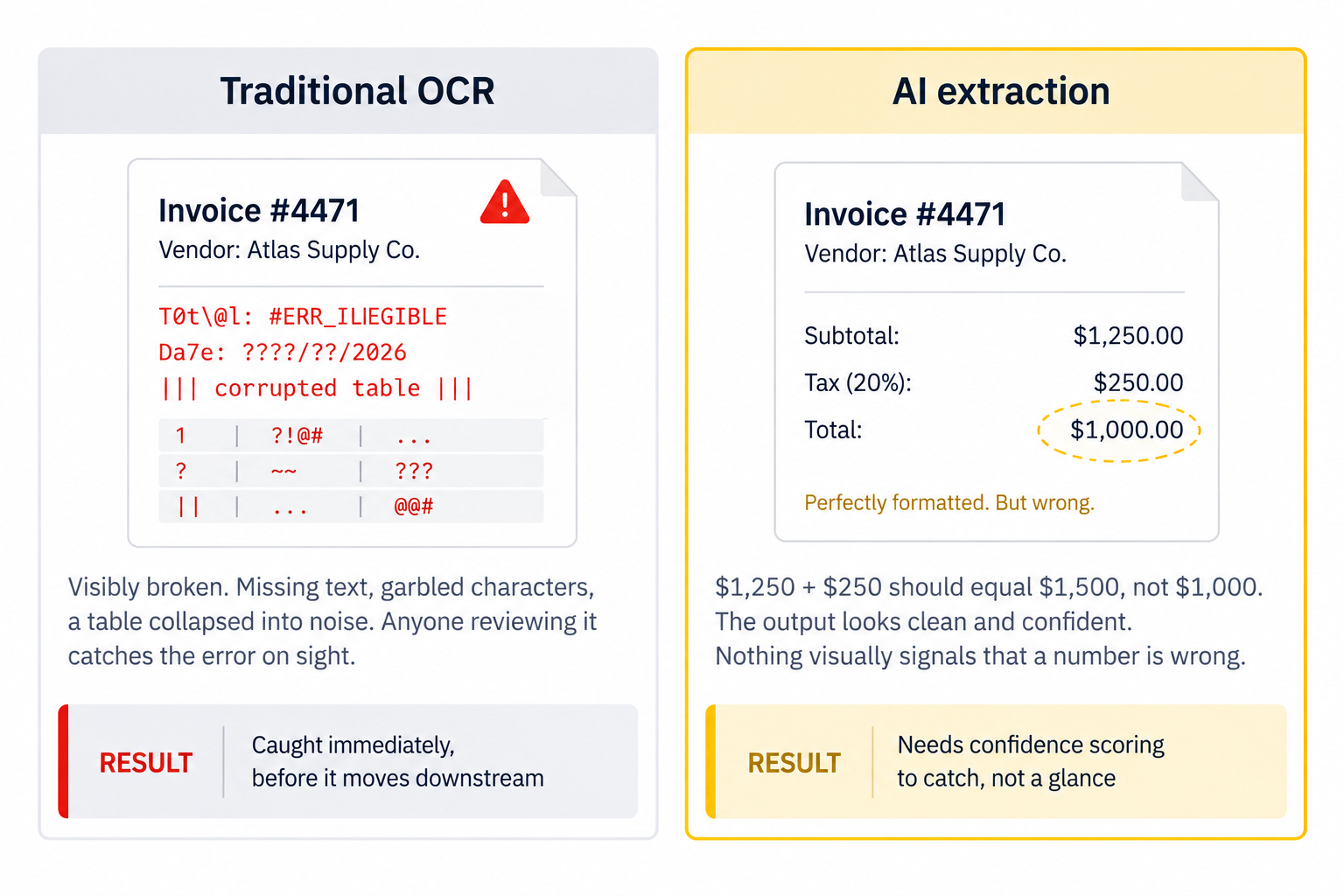
This is precisely why confidence scoring matters more with AI extraction than it ever did with classic OCR. It's not a nice-to-have feature. It's the mechanism that turns a silent failure back into a visible one.
The hallucination problem, stated plainly
Even within the current generation of document-specialized models, the underlying architecture still carries risk. Recent technical analysis of state-of-the-art OCR-focused vision-language models notes that most still perform layout detection as a separate stage before recognition, which means an error in the layout stage propagates into everything extracted afterward, even in systems built specifically for documents rather than general conversation.
In practice, this shows up as a model that extracts a real-looking value from the wrong place on the page, or merges two fields that should have stayed separate, all while returning output that looks perfectly formatted. None of this is a reason to avoid AI-based extraction. It's a reason to insist on validation logic sitting on top of it, rather than trusting model output the way you'd trust a calculator.
Three tiers, compared directly
Here is the same comparison as capability rather than opinion.
| Criteria | Traditional OCR | General-purpose LLM vision | Purpose-built LLM OCR |
|---|---|---|---|
| Accuracy, clean printed text | 95-98% | 90-95% | 90-98% |
| Accuracy, complex layouts | 40-60% | 65-75% | Deep |
| Handles layout variance without a new template | No | Yes | Yes |
| Failure mode when wrong | Obvious (garbled, missing) | Subtle (plausible, silent) | Flagged (confidence score) |
| Per-field confidence scoring | No | No | Yes |
| Business-rule validation (totals, dates) | No | No | Yes |
| Document classification before extraction | No | Partial | Yes |
| Infrastructure | CPU | Hosted API | Hosted API |
| Output consistency, same input | Deterministic | Variable | Variable, scored |
| Built specifically for document extraction | Yes | No | Yes |
"Deep" indicates a dedicated capability built into the architecture rather than a general capacity applied to documents. Accuracy ranges are drawn from independent third-party benchmarks cited in the Sources section, not vendor-reported figures, and vary by document domain and quality. Purpose-built LLM OCR figures reflect Koncile's own architecture and have not been independently benchmarked against the same corpus as the traditional and general-purpose columns.
What actually changes, by document type
1. Bank statements and financial records
Dense tables, small fonts, multi-page statements, and the exact domain where general-purpose vision models have shown the widest accuracy variance in independent testing. This is also where the gap between "reads the numbers" and "validates that the numbers reconcile" matters most: a running balance that doesn't check out against the transaction list is a business-logic failure a purpose-built pipeline is designed to catch, not something a general-purpose model is checking for unless explicitly built to. Anyone evaluating bank statement extraction should test this specifically before committing, on real statements, not a clean sample. Meelo did exactly that on multi-account statements: going from ten to more than ninety five percent correct account identification came down to configuration, not technology.
2. Invoices and accounts payable
The core AP problem has always been layout inconsistency: every vendor formats their invoice differently, and traditional OCR needs a new template every time one changes. This is the use case where AI extraction shows the clearest, least contested win, because "understand this is an invoice regardless of layout" is close to the ideal problem for a language model. The harder part is everything after extraction: checking a line-item total against the invoice total, flagging a duplicate against last month's invoice OCR queue, matching against a purchase order. That's validation logic, not extraction, and it's where a general-purpose model call stops and a purpose-built pipeline continues.
3. Forms and handwriting
Handwriting is the case where the improvement is largest and still incomplete. Vision-language models handle legible handwriting meaningfully better than classic OCR, largely because they can infer an ambiguous character from surrounding context the way a human reader does. Cursive script and forms mixing printed and handwritten fields on the same page remain genuinely hard for every option on the market, AI-based or not. Treat handwriting accuracy claims with more skepticism than any other category, and test on your actual worst-quality samples before trusting a number from a vendor datasheet.
4. Identity documents and KYC
ID documents, proofs of address, and onboarding paperwork vary by country and format in ways that punish rigid templates specifically. AI-based extraction handles the format variance well. The harder requirement in this category usually isn't extraction accuracy at all, it's verifying the document itself hasn't been altered, which is a different problem from reading it correctly, and one worth confirming any vendor actually addresses rather than assuming it comes bundled with good extraction. On a motor underwriting file, consistency across documents matters as much as each document: that is what Toyota Assurances checks across nine documents per file.
Moving off legacy OCR without breaking what already works
The realistic path is parallel, not a cutover. Pick one high-volume workflow, run the new OCR solution alongside the existing one without removing anything, and define what you're actually measuring and comparing before you start: extraction accuracy against a manually verified sample, cycle time from document received to data usable, and manual review rate. Without those numbers agreed in advance, "the new system feels faster" becomes the only evidence anyone has, and that's not evidence.
Let that parallel run continue long enough to hit your actual document variety, not just a clean pilot batch, since the whole argument for switching rests on how the system handles the edge cases that break template-based OCR in the first place. Expand by document type once the numbers hold, not by team or geography, since accuracy on invoices tells you very little about accuracy on identity documents. Retire the legacy component last, once its replacement has a track record on the exact volume and variety it's replacing, not before.
Where Koncile fits in this

Koncile is built as the third category described above: an LLM-based extraction pipeline with validation built around it, not a general-purpose model called directly on a document. Documents are classified before extraction, so the system knows it's looking at an invoice or a bank statement before it starts pulling fields. Every extracted value carries a confidence score and a citation back to its location in the source document, so a low-confidence field is visible as exactly that rather than presented with the same certainty as everything else. Business-rule validation runs on top, the same logic behind automated invoice verification: totals get recomputed, relationships between fields get checked, and inconsistencies get flagged rather than silently accepted.
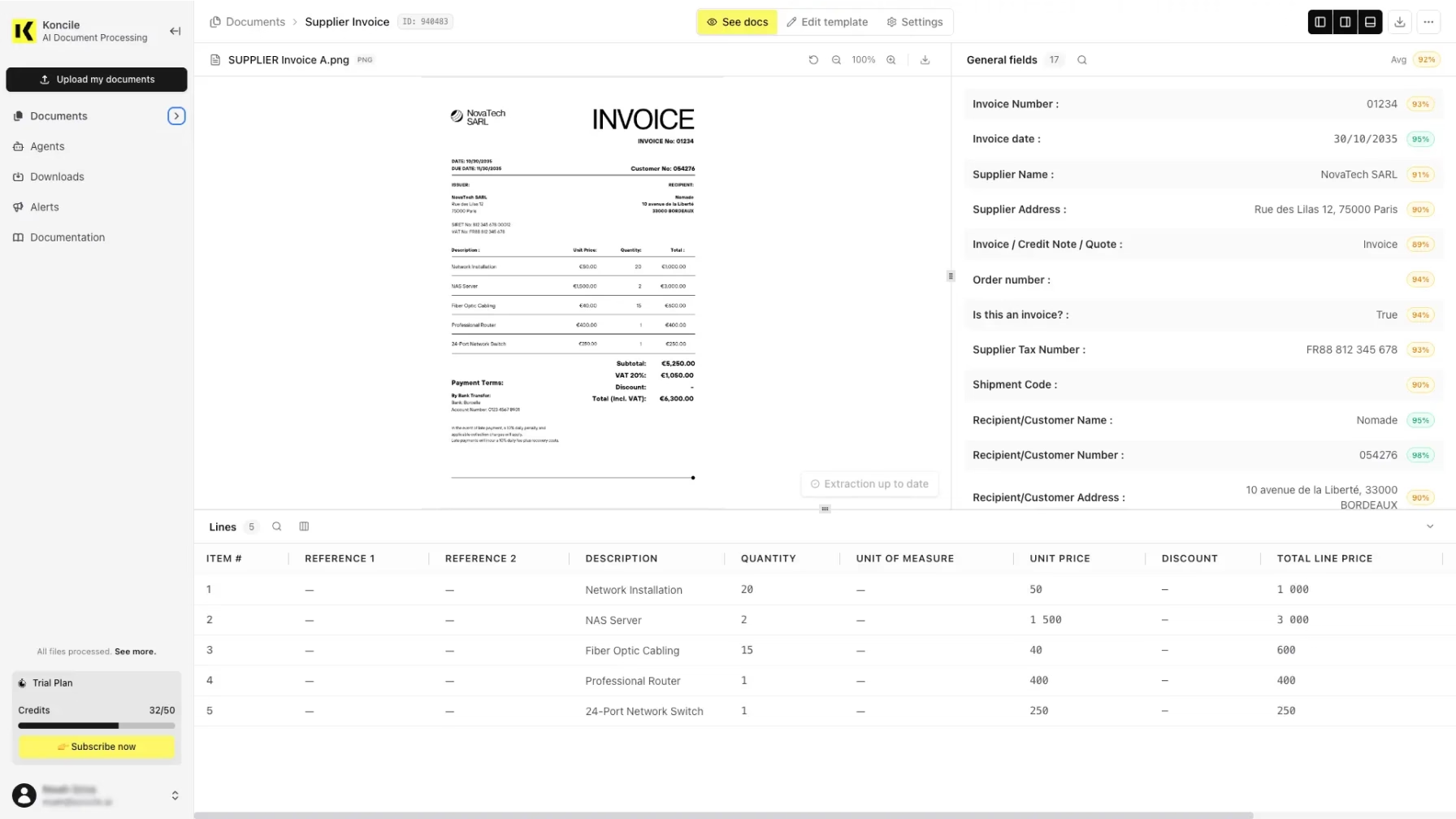
This covers invoices, bank statements, identity documents, KYC files, logistics paperwork, and contracts, through a no-code platform or a REST API, without templates and without the reconfiguration cost that made legacy OCR expensive to maintain in the first place. It doesn't remove the need to validate a new vendor's output against your own documents before trusting it in production. Nothing in this category earns that trust by default, including this one.
The direction this is heading
The reason this shift matters beyond raw accuracy is what becomes possible once a system understands a document instead of just transcribing it: checking a contract for a specific clause across a portfolio, flagging every invoice above a threshold automatically, catching a numerical inconsistency before it reaches accounting rather than after. Reading text was always step one. Reasoning over what the text means, and catching what doesn't add up, is the part intelligent document processing actually changes about how a back office runs.
Your questions about AI OCR vs traditional OCR
Is using OpenAI's ChatGPT or Gemini on a PDF the same as AI OCR?
It's one version of it, and the version with the least validation built in. General-purpose vision models can read and understand documents meaningfully better than classic OCR, but their accuracy varies by document domain, and they weren't built with confidence scoring, business-rule validation, or document classification designed specifically for extraction workflows. For a one-off document, it's a reasonable tool. For a production workflow processing hundreds of documents a day, the lack of built-in validation is exactly where problems surface later.
Does AI OCR hallucinate?
Yes, and the failure mode is specifically that it can extract a confident, plausible-looking, and wrong value without any visible sign something went wrong. This is a documented difference from classic OCR, whose errors tend to be obvious rather than subtle. Confidence scoring and validation against business rules are the mechanisms that catch this before it reaches a downstream system.
How much more accurate is AI OCR than traditional OCR, really?
On clean, standard printed text, the gap is real but not dramatic: good traditional OCR gets 95 to 98 percent, AI-based extraction is comparable or somewhat ahead. On complex forms and multi-structure documents, traditional OCR drops to roughly 40 to 60 percent while AI-based approaches hold up meaningfully better, commonly cited in the 65 to 75 percent range and higher for purpose-built systems. Our companion piece on why LLM OCR outperforms classic OCR covers the mechanism behind that gap. It widens specifically as document complexity increases, which is also exactly where legacy OCR maintenance costs are highest.
Can I run AI OCR and my existing OCR system at the same time?
Yes, and this is the recommended migration path rather than a full cutover. Running both in parallel on the same document volume lets you compare extraction accuracy and manual review rates on real data before retiring anything, which removes most of the risk that makes migrations feel dangerous.
Does AI OCR need a GPU?
If you're self-hosting an open-source vision-language model, yes, typically. If you're using a hosted API, whether a general-purpose model provider or a purpose-built OCR API, the infrastructure is the vendor's problem rather than yours. This is one of the more overlooked cost factors when teams evaluate self-hosting versus a hosted solution.
What is the difference between AI OCR and intelligent document processing?
AI OCR describes the extraction layer specifically: reading and understanding a document. Intelligent document processing is the broader category that includes what happens after extraction, classification, validation, routing, and integration into business systems. AI OCR is usually the component that makes modern IDP possible, not a replacement term for it.
Is AI OCR worth it for a small volume of documents?
Usually not on cost grounds alone. The case for AI-based extraction strengthens with document variety and volume, since that's precisely what breaks template-based systems and drives their hidden maintenance cost. A small, stable volume of consistently formatted documents is exactly the case where traditional OCR remains the cheaper, simpler, and entirely reasonable choice.
Why does accuracy vary so much between different AI models on the same type of document?
Because general-purpose vision-language models are trained across a broad mix of content, not specialized for financial or business documents specifically, and that shows up as real performance variance by domain. It's a specific, documented reason to test any model, purpose-built or general-purpose, on your actual document types before trusting a benchmark score that was measured on someone else's documents.
Sources
- Vellum AI, Document Data Extraction in 2026: LLMs vs OCRs. OCR and LLM failure mode comparison, and Omni AI research on end-to-end extraction accuracy.
- Firstsource, Vision Language Model (VLM)-Based Information Extraction. Accuracy ranges for traditional OCR versus GenAI extraction across document complexity and handwriting.
- Benchmarking Vision-Language Models on Optical Character Recognition in Dynamic Video Environments, arXiv 2502.06445. Domain-specific accuracy variance across GPT-4o, Gemini 1.5 Pro, and traditional OCR engines.
- HunyuanOCR Technical Report, arXiv 2511.19575. Layout-detection error propagation in current-generation OCR-focused vision-language models.
- Koncile, Why LLM OCRs Are the Future of Intelligent Document Processing. Companion piece on the underlying mechanism of context-aware extraction.

Real life insights on document automation

5 Best French OCR Solutions to Extract Data from Your Documents
French OCR solutions now make it possible to automatically extract data from your invoices, contracts, and accounting documents using optical character recognition, with hosting based in France. Here is a real comparison of all five OCR solutions, corrected against current 2026 figures where vendor claims had gone stale, covering what actually differentiates them beyond the fact that they are all hosted in France.
Document processing and fraud detection: build or buy?
Extracting and structuring document data, enriching it, detecting fraud: with AI, building your own end-to-end solution has never looked so simple. Buying off the shelf still often turns out to be the better option. Here are the thirty-nine difficulties to expect before you start.

In healthcare, an OCR is judged on what it flags, not on what it reads
Every OCR vendor advertises high accuracy rates, and most of them deliver. On a health document, that is not the right buying criterion. What counts is what the tool does when it is not sure, what it lets you verify, and what it guarantees about the data it handles.

Top Healthcare OCR Tools: HIPAA Compliance and What the Clinical Evidence Shows
Amazon Textract has been formally HIPAA-eligible since October 2019. Most healthcare OCR comparisons never mention that, or check which of the other four tools on their list actually offer a signed BAA. Here is a rebuild that checks compliance status directly, and looks at what the real clinical trials on ambient AI scribes actually found, not just what the marketing claims.
Best Accounting Software for Sole Proprietors and Freelancers in 2026
A freelancer sending a dozen invoices a month can blow through Xero's cheapest plan by week three, and a $19-a-month FreshBooks account caps out at five clients. The number on a pricing page is rarely the number you actually pay. Here is a real comparison of QuickBooks, Xero, Wave, and FreshBooks built for a business of one, not a growing team.