.avif)
Tesseract OCR: is it still the best open-source OCR in 2026?
Tesseract is a top open-source OCR, but is it still best in 2026? Let’s review its pros, cons, and alternatives.
.avif)
Among the many solutions available on the market, Tesseract is often cited as one of the best open-source OCR tools. But is it still the best solution in 2026? We analyse its performance, strengths, limitations, and open-source OCR alternatives.
What exactly is Tesseract OCR?
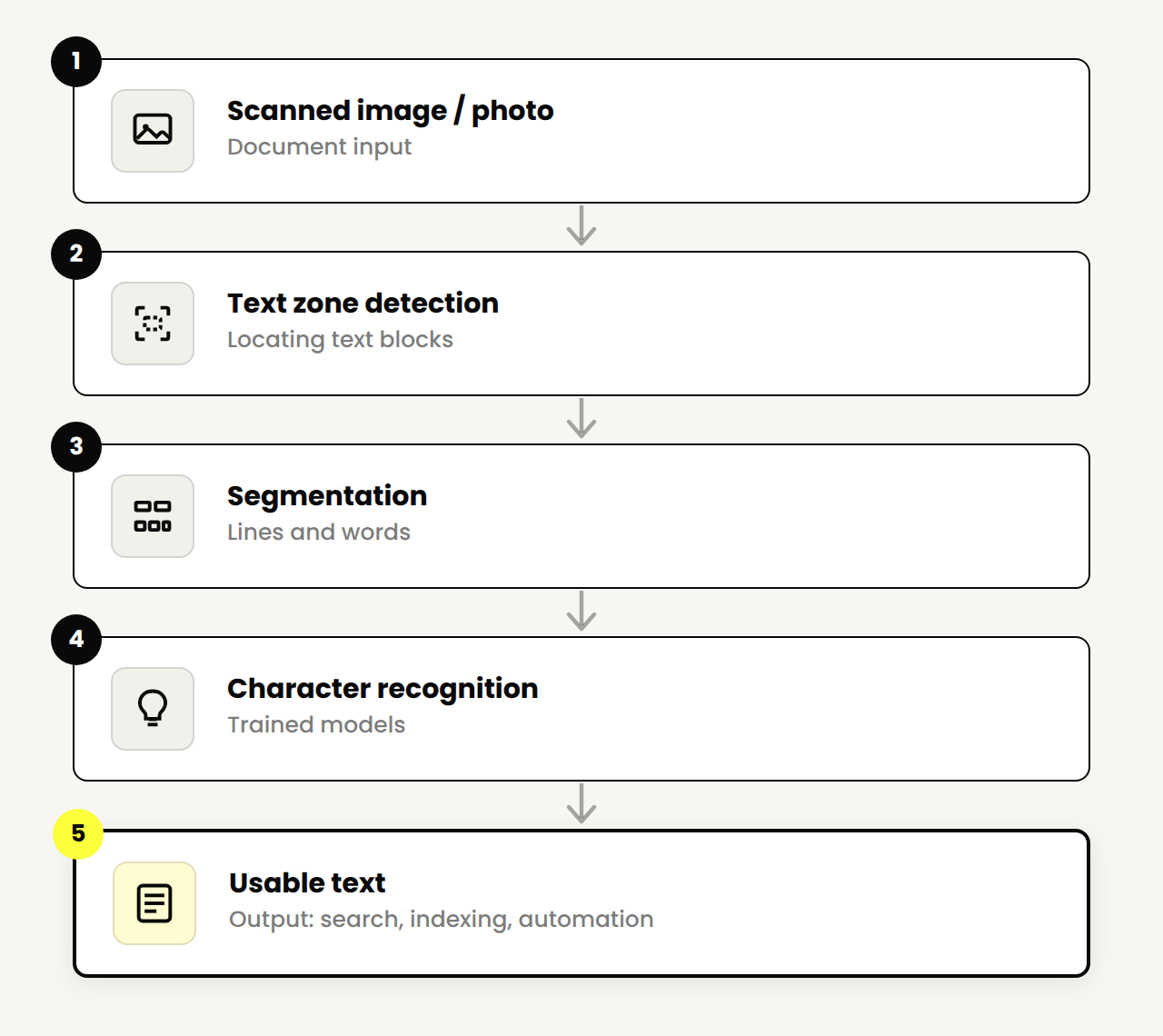
Tesseract OCR is an engine capable of detecting and extracting text from images, turning them into actionable digital content.
Originally developed in the 1980s by Hewlett-Packard, the project gained new momentum once Google took over its development and maintenance.
Tesseract is distributed under the Apache 2.0 licence: free, and free to use, modify, or redistribute without asking anyone's permission. In practice, a company can integrate it into its own software, adapt it to its documents, or fix a bug itself rather than waiting for a vendor patch. This is also what explains its longevity: more than twenty years after its creation, a community of developers keeps maintaining it.
What We Measured: Tesseract Against Real Invoices
The introduction promises an analysis of Tesseract's performance. Rather than a general claim, here is the result of a test we ran ourselves.
We ran Tesseract 5.3.4 on 14 invoices reconstructed from real layouts, with amounts and table lines known in advance, deliberately degraded to mimic common scanning conditions: noise, slight blur, low contrast, photocopy, a stamp overlapping the text, and slight rotation. For each one, we checked whether the expected totals and table lines were recovered exactly in the raw text returned by Tesseract, with no post-processing or manual correction.
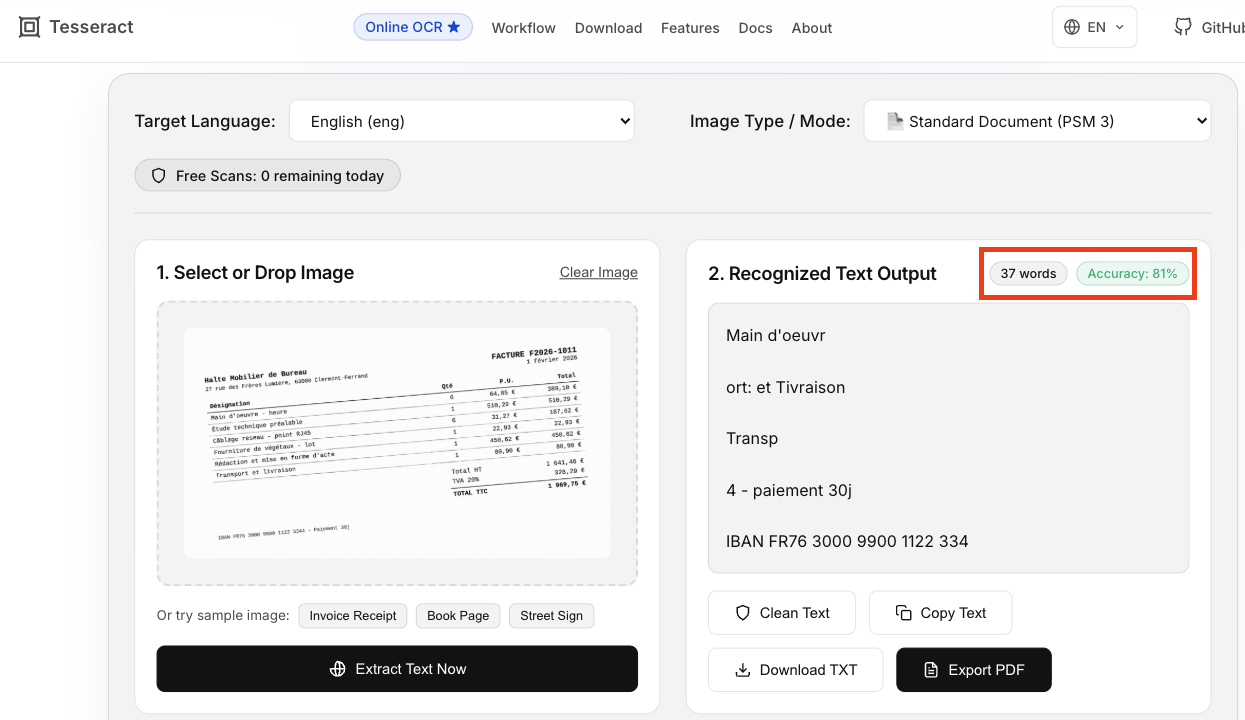
Across these 14 invoices, Tesseract correctly recovered 81.4% of the 70 numeric fields checked (totals and table lines), in 0.44 seconds per page on average, on a single CPU thread with no GPU. This average hides a sharp gap depending on the type of degradation: on noise, slight blur, a high-contrast photocopy, or a stamp overlapping the text, Tesseract recovers nearly all the values (100% in our tests). But as soon as an invoice is slightly tilted, 3 to 5 degrees, nothing more, that rate drops to 31%. The columns of figures become misaligned and the engine often returns text that no longer contains any amount, without ever flagging an error.
.png)
On the invoice above, the rotation doesn't hinder human reading at all, but Tesseract fails to recover any of the six table lines or the total of €1,969.75, without raising the slightest error. This is the most concrete blind spot of OCR alone: the engine never knows how to say "I'm not sure" or "I failed". Without human oversight or a downstream verification layer, this kind of silent error goes straight into the books.
Methodology: test conducted in September 2026 on a reconstructed corpus, not on client invoices, for confidentiality reasons, which also made it possible to have reference values known in advance for each field. It does not replace a measurement on a real production corpus, which we will document in a future update to this article, but gives a verifiable order of magnitude, with method and data available on request, rather than an unsourced marketing figure.
The advantages of Tesseract OCR
Tesseract's advantages come down to one idea: free, proven for twenty years, and able to run without a GPU or heavy infrastructure.
The disadvantages of Tesseract OCR
Tesseract's disadvantages centre on everything outside clean printed text: nested tables, handwriting, complex layouts.
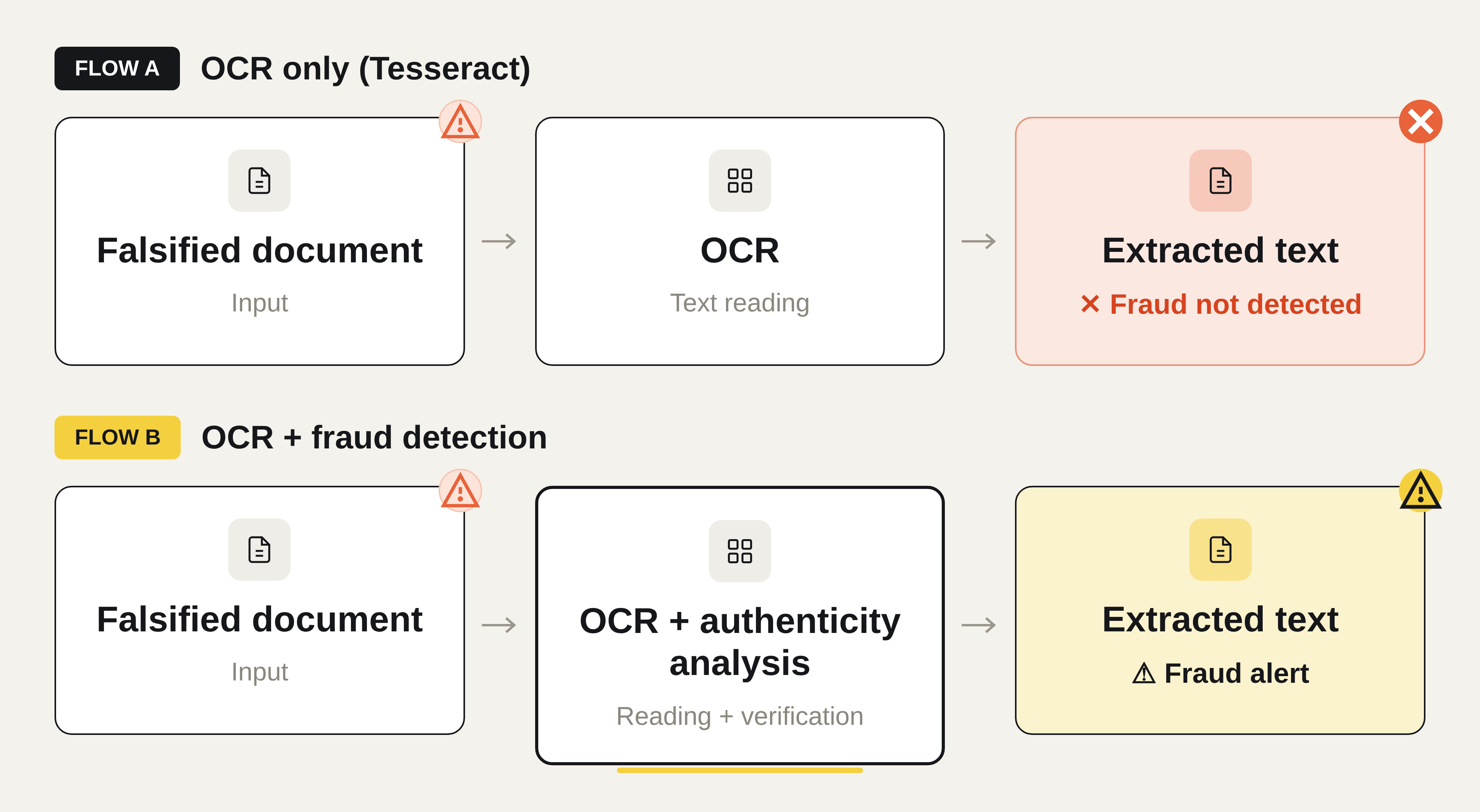
One point does not appear in the table above but deserves particular attention for sensitive use cases: Tesseract, like any pure OCR engine, only reads text, with no ability to check whether a scanned document has been altered, falsified, or fabricated. For sectors that handle high-value supporting documents (insurance, banking, HR, real estate), this limitation makes it worth combining OCR with a dedicated document fraud detection layer, capable of analysing file structure and the consistency of extracted data, not just their readability.
Open-source OCR alternatives to Tesseract
Tesseract remains one of the most popular and robust open-source OCR solutions in 2026, particularly for standard text-extraction applications on clean, printed documents, with no need for a GPU to run. However, its limitations on complex layouts, handwriting recognition, and its dependency on image preprocessing have opened the door, since 2025, to a new generation of open-source alternatives, limitations especially visible in cases requiring fine handwriting recognition, an area we compare in our dedicated handwriting OCR analysis.
In 2026, the real alternatives to Tesseract are no longer classic OCR engines but open-source vision-language models, olmOCR, PaddleOCR-VL, and DeepSeek-OCR-2 leading the way, which read tables and handwriting better, at the cost of a GPU. Before the detail, here is the direct comparison several readers asked for: the seven engines mentioned in this article, on the same criteria.
In 2026, these alternatives are no longer classic OCR engines like Tesseract, but open-source vision-language models (VLMs): instead of spotting characters one by one, they read a page as a whole image, which lets them handle tables, handwriting, and complex layouts far better. The trade-off is hardware: where Tesseract runs on a simple CPU, these models need a GPU to run under reasonable conditions.
Several of these models have established themselves since 2025. PaddleOCR-VL, developed by Baidu under the Apache 2.0 licence, remains the lightest (0.9 billion parameters) while achieving excellent results on tables and formulas, we compare its classic version to Tesseract in detail in our PaddleOCR vs Tesseract analysis. olmOCR, released by the Allen Institute for AI (AI2) under the Apache 2.0 licence, relies on a heavier model (7 billion parameters, 12 GB of VRAM minimum) to handle equations, tables, and handwriting well. DeepSeek-OCR-2, released in January 2026, goes further in reading multi-column layouts and complex formulas across more than 100 languages. dots.ocr, developed by the Chinese lab rednote-hilab under the MIT licence, remains very compact (1.7 billion parameters) but loses accuracy on the densest tables. GLM-OCR, from Zhipu AI, goes down to 0.9 billion parameters while keeping good results on handwriting extraction. And the Qwen-VL family, released by Alibaba under the Apache 2.0 licence, covers OCR in 32 languages with several model sizes depending on the compute power available.
Mistral OCR is often mentioned in the same context, but doesn't belong to this category: it's a proprietary API, not a distributable or self-hostable open-source model, it relies on the same contextual understanding, without the model weights or the ability to install it yourself.
This is what today's intelligent document processing solutions offer, combining OCR, contextual understanding, and business-process automation. The real question to ask in 2026 is therefore no longer "Tesseract or which alternative", but "CPU or GPU": Tesseract remains the right choice for standard, free needs with no GPU infrastructure to manage, while open-source VLMs or AI-based solutions go significantly further on complex documents, provided a GPU can be hosted. The choice therefore depends less on the brand than on actual priorities, document complexity, and available infrastructure.
Concretely, this splits into two use cases. For full-text search or digital archiving, finding a word across a batch of scanned PDFs, for example, Tesseract is largely sufficient, free, and with no vendor dependency. The handoff becomes necessary as soon as the extraction needs to be structured (finding the right line in an invoice table, not just raw text), a document needs to be automatically matched against a purchase order or a payment, and verified as unaltered, three needs that no pure OCR engine, Tesseract included, covers. This is Koncile's positioning, which claims a success rate above 99% on essential invoice fields and more than 150 document-fraud signals detected (figures provided by Koncile; unlike the Tesseract test detailed earlier in this article, the company does not publish the measurement methodology behind these two figures). The two pillars are therefore complementary: structured extraction on one side, authenticity verification on the other.
To go further, see our selection of the 10 best open-source OCR tools in 2026.
FAQ

Real life insights on document automation
5 Best French OCR Solutions to Extract Data from Your Documents
French OCR solutions now make it possible to automatically extract data from your invoices, contracts, and accounting documents using optical character recognition, with hosting based in France. Here is a real comparison of all five OCR solutions, corrected against current 2026 figures where vendor claims had gone stale, covering what actually differentiates them beyond the fact that they are all hosted in France.
Document processing and fraud detection: build or buy?
Extracting and structuring document data, enriching it, detecting fraud: with AI, building your own end-to-end solution has never looked so simple. Buying off the shelf still often turns out to be the better option. Here are the thirty-nine difficulties to expect before you start.
In healthcare, an OCR is judged on what it flags, not on what it reads
Every OCR vendor advertises high accuracy rates, and most of them deliver. On a health document, that is not the right buying criterion. What counts is what the tool does when it is not sure, what it lets you verify, and what it guarantees about the data it handles.

Top Healthcare OCR Tools: HIPAA Compliance and What the Clinical Evidence Shows
Amazon Textract has been formally HIPAA-eligible since October 2019. Most healthcare OCR comparisons never mention that, or check which of the other four tools on their list actually offer a signed BAA. Here is a rebuild that checks compliance status directly, and looks at what the real clinical trials on ambient AI scribes actually found, not just what the marketing claims.
Best Accounting Software for Sole Proprietors and Freelancers in 2026
A freelancer sending a dozen invoices a month can blow through Xero's cheapest plan by week three, and a $19-a-month FreshBooks account caps out at five clients. The number on a pricing page is rarely the number you actually pay. Here is a real comparison of QuickBooks, Xero, Wave, and FreshBooks built for a business of one, not a growing team.