Contents
PDF metadata is the information a file keeps about itself: its title and author, the program that created the original, the program that wrote the PDF, and the dates it was created and last modified. You can read it in a few seconds with Ctrl+D in Adobe Acrobat or Reader (Cmd+D on a Mac), with the Inspector in Preview, or with pdfinfo on the command line. For teams that receive documents from customers, it is also the first layer of document fraud detection: a statement whose Producer field names a consumer PDF editor is one of the first things a fake bank statement detector looks at. This guide shows where to find the metadata, how to read each field, and what it can and cannot prove.
How do you view PDF metadata?
Every common PDF reader shows at least the basic fields, and two free command line tools show everything, including the XMP stream that desktop readers often hide. The table lists the fastest way in each one, checked on November 11, 2026.
| Tool | Where to click | What you see |
|---|---|---|
| Acrobat or Reader | File, Properties (Ctrl+D) | Title, author, Creator, Producer, dates, PDF version |
| Acrobat Pro | Properties, Additional Metadata | The XMP stream |
| Preview (Mac) | Tools, Show Inspector (Cmd+I) | Title, author, Creator, Producer, dates |
| Chrome | Menu, Document properties | Basic fields and PDF version |
| pdfinfo | pdfinfo file.pdf | All Info fields; XMP with -meta |
| ExifTool | exiftool file.pdf | Info and XMP side by side |
Desktop readers are enough to check a title or an author. For anything that touches authenticity, use a tool that prints both the Info fields and the XMP stream, because the interesting cases are the ones where the two disagree. Our free pdf metadata viewer reads the file in your browser without uploading it and also counts the saved versions inside the file.
Where is metadata stored in a PDF?
A PDF can carry metadata in three different places. Readers usually show the first one only, which is why two tools can report different information about the same file.
The Document Information dictionary
This is the original metadata structure of the PDF format: a short list of keys named Title, Author, Subject, Keywords, Creator, Producer, CreationDate, ModDate and Trapped. Dates are written in a compact form such as D:20261111072225Z. PDF 2.0, published by ISO in 2017 as ISO 32000-2, deprecates this dictionary except for the two dates, but almost every program still writes it, so it remains the first place to look.
The XMP metadata stream
Since PDF 1.4, a file can also embed an XMP packet, a block of XML based on Adobe's Extensible Metadata Platform. It repeats the same information under other names (xmp:CreatorTool, pdf:Producer, xmp:CreateDate, xmp:ModifyDate) and can add much more: a DocumentID that should stay the same for the life of the document, an InstanceID that changes with each version, and sometimes an editing history listing which application saved the file and when. Many generators never write XMP at all; Adobe products almost always do.
The file identifier and saved versions
The end of a PDF holds a trailer with an ID made of two strings. The PDF specification asks for the first one to be set when the file is created and kept, and for the second one to change whenever the file is updated. A PDF can also be saved incrementally: the editor appends the changes at the end of the file instead of rewriting it, and the previous version stays inside. Each saved version ends with its own %%EOF marker, which is how forensic tools count them. One caution: a file optimized for fast web view legitimately contains two markers.
What does each field reveal about a document?
Read one field alone and you learn little. Read them against what you know about the issuer and they start telling a story. Here is what each one says, and what usually explains an odd value.
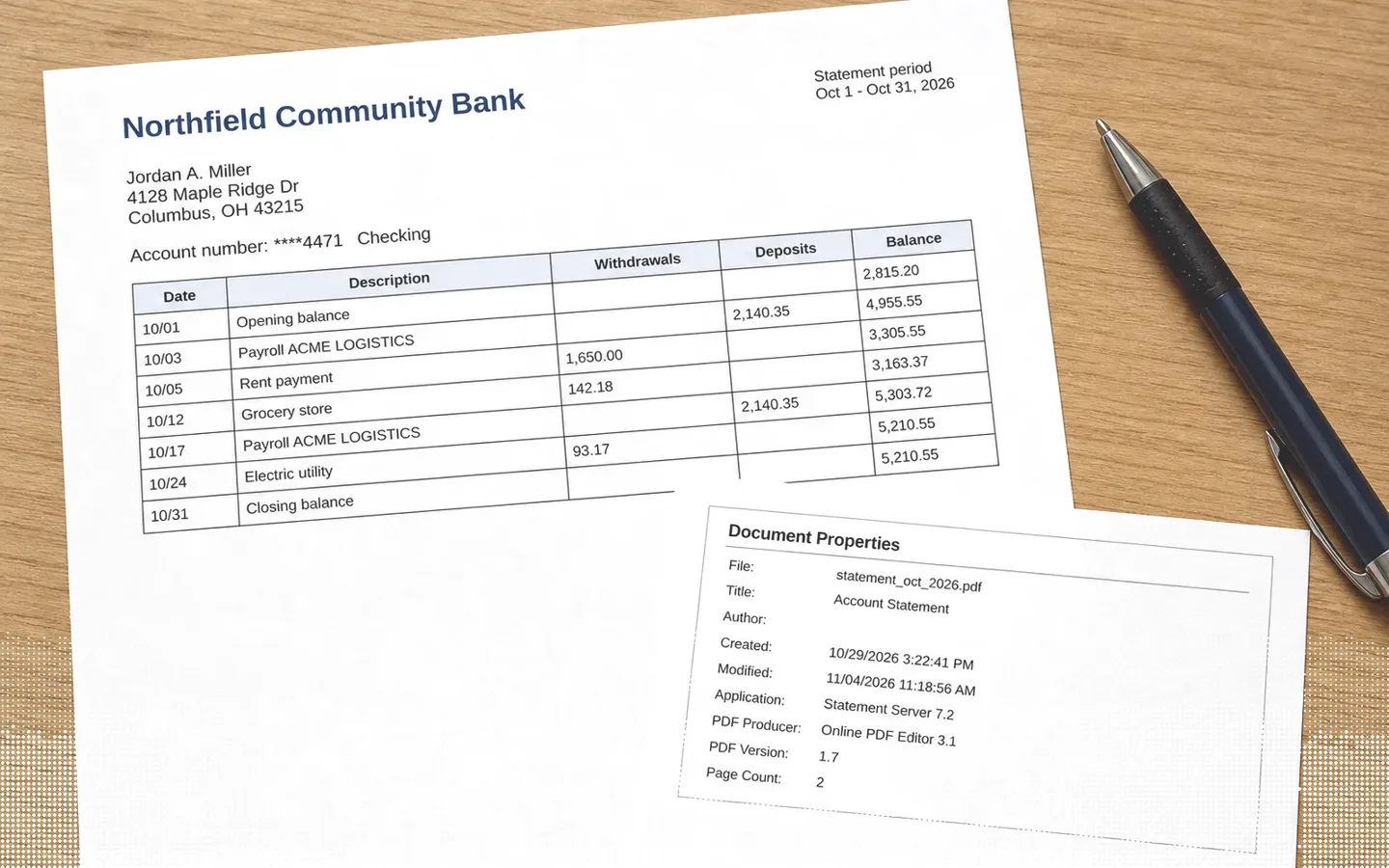
Creator and Producer. Creator names the program in which the content was written (Word, Writer, a payroll system), Producer the program that turned it into a PDF. A bank, a payroll provider or a utility generates its statements on servers, with the same software chain every month. When last month's statement from the same bank names a reporting engine and this one names an online PDF editor or a design tool, the file has been through other hands.
CreationDate and ModDate. A statement downloaded once from an online bank usually has a creation date matching the download, and a modification date that is absent or identical. A modification several days later, a creation date before the period the statement covers ends, or a modification date earlier than the creation date all deserve a second look.
PDF version. Each program writes a version it supports. A version that does not match the tools the issuer uses, or that changed between two statements from the same source, points to a re-export.
Author. Often empty in server-generated files. When it holds a person's name or a computer account on a document that is supposed to come out of an automated system, someone opened and saved it on their own machine.
XMP history and IDs. When an XMP stream is present, compare it with the Info dictionary. Some editors update one and forget the other, so a Producer in the dictionary that differs from pdf:Producer in XMP, or an InstanceID history listing an editing application, records the edit in the file itself.
Can PDF metadata prove a document was edited?
No, not on its own, and treating it as proof leads to two kinds of mistakes. Metadata can be stripped or rewritten with free tools, so a clean result does not clear a file. And many legitimate documents look odd: a customer who prints a statement to PDF from a browser, or a broker who merges several files, changes Creator, Producer and dates without changing a single figure.
Metadata works best as one signal among others. At Koncile, the analysis of a document runs on three layers: the file (its software chain, saved versions, hidden objects and characters whose displayed value differs from the stored one), the image (retouched areas, generated content), and the business logic (totals, dates and identifiers that must agree). The result is a score from 0 to 100 that never reaches certainty: a screening signal for your team, not a verdict. The limit is real too: a careful forger who edits with a specialized tool and then flattens the document into a fresh file leaves little in the metadata, and the other two layers have to catch it.
The practical rule for a review team: compare the file with a known genuine document from the same issuer, explain every difference, and escalate the ones you cannot explain. Our guide to hidden fraud signals in PDF files goes further on how these weak signals add up to a score.
Is PDF metadata a privacy risk?
It can be. The Author field often carries the name of the person or the computer account that created the file, XMP can hold file paths and editing history, and a document shared outside your company keeps all of it. Before publishing a PDF, check its properties, clear the fields that name people, and use the Remove Hidden Information or Sanitize Document feature in Acrobat Pro when the file leaves your organization. Exporting a fresh PDF from the source document also drops most of the history.
How we researched this guide
We read the ten first Google results for "pdf metadata" in the United States on November 11, 2026, the PDF specifications (ISO 32000-1 and ISO 32000-2), Adobe's help pages for Acrobat and the Poppler documentation for pdfinfo. We then made two PDFs from the same short sample statement and read them with pdfinfo. The file exported by LibreOffice 24.2 reported Creator "Writer", Producer "LibreOffice 24.2", a creation date, no modification date and no XMP stream. The same content printed to PDF by Chromium reported Creator "Chromium", Producer "Skia/PDF m153" and a modification date identical to the creation date, again without XMP. Two common tools, two different fingerprints, and neither one writes a modification date that differs from creation: an absent ModDate is normal, which is why it should never count against a document by itself.
Frequently asked questions
What is PDF metadata?
It is information stored inside a PDF that describes the file rather than its pages: title, author, subject, keywords, the program that created the content, the program that produced the PDF, and the creation and modification dates. It sits in the Document Information dictionary and, in many files, in an XMP stream.
How do I see the metadata of a PDF?
In Adobe Acrobat or Reader, press Ctrl+D (Cmd+D on a Mac) to open Document Properties. On a Mac, Preview shows it under Tools, Show Inspector. In Chrome's PDF viewer, open the menu and choose Document properties. For the full XMP stream, use pdfinfo -meta or ExifTool.
Can you tell if a PDF has been edited from its metadata?
Sometimes. A modification date well after the creation date, a Producer that does not match the issuer's usual software, several saved versions or Info and XMP fields that disagree all suggest an edit. None of them proves it, and metadata can be stripped, so it should be combined with checks on the content and the figures.
What is the difference between Creator and Producer in a PDF?
Creator is the application used to write the original content, such as Word or a payroll system. Producer is the software that converted that content into a PDF file, such as Acrobat Distiller, LibreOffice or the PDF engine of a browser. The two are often different programs.
Can PDF metadata be faked?
Yes. Every field can be rewritten or removed with free software, which is why metadata is a screening signal and never proof that a document is genuine. Its value comes from comparison: a file whose metadata does not match genuine documents from the same issuer needs an explanation.