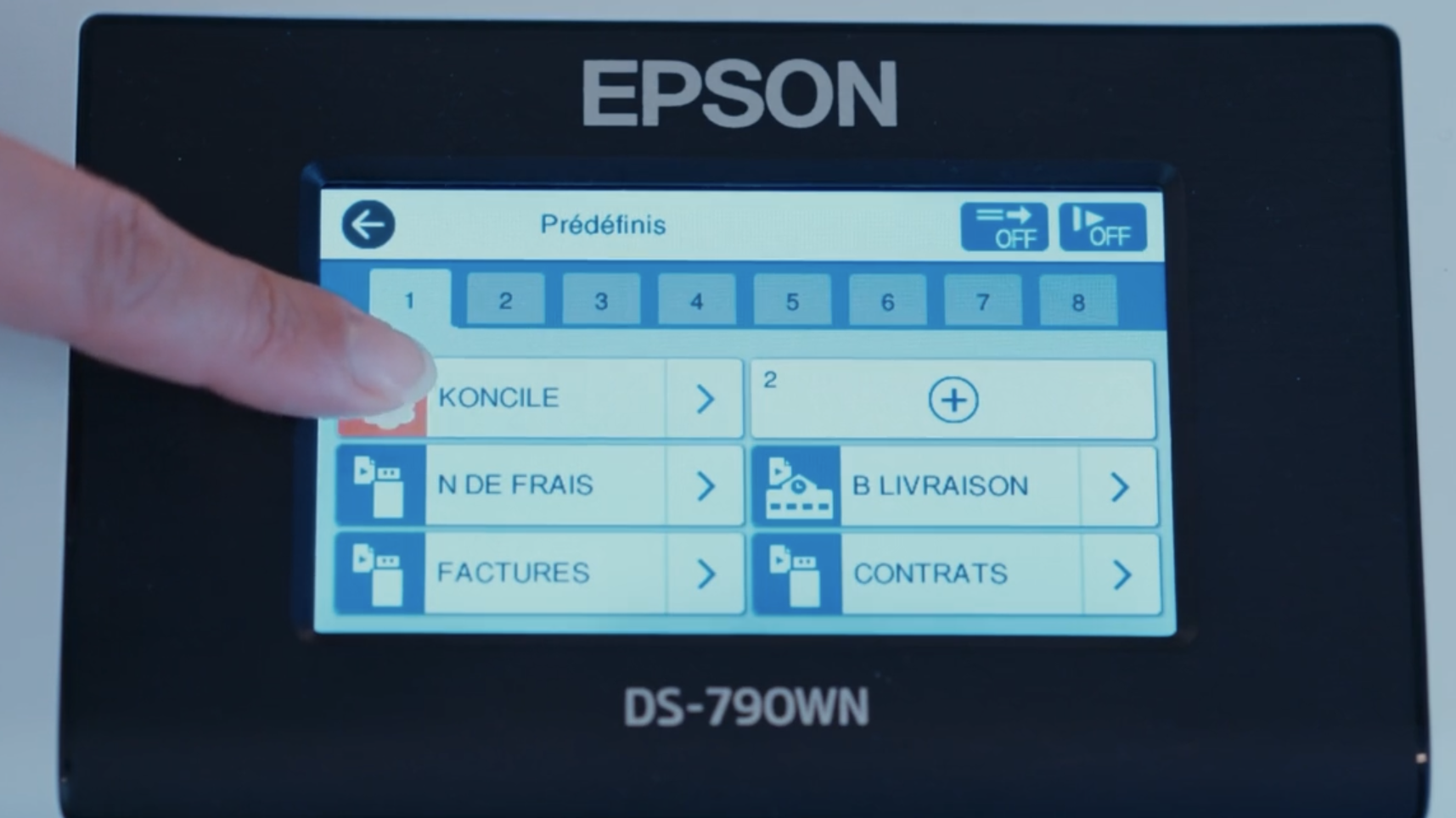
EPSON × Koncile: AI data extraction built into the scanner
How EPSON turned its scanners into true data-entry points with Koncile's AI. Operational in a few minutes, with zero manual re-entry.
At EPSON France, a scanner no longer simply turns paper into PDF: traditional scanning changes a document's format, but never its status — someone still has to open it, read it, and re-enter it. Paired with Koncile through a simple button, with no PC and no development required, the device becomes a data entry point whose output is directly usable by business software.
The problem: a scanned document that changes format, never status
The problem was never the machine. It lies in what happens right after. The document gets scanned, and everything still needs to be done: someone opens the PDF, reads it, copies the data, assigns a reference, files it. The document has changed format, not status. A scanner isn't just the equivalent of a keyboard, as Jean-Michel Pavie, Scanner Sales Manager at EPSON France, puts it: you can do a lot more once you pair it with the right tools.
Standard scanning tools know how to classify, name and store. They don't truly understand documents, and they can't automate your tasks end-to-end. That's the barrier Koncile removes: the fields to extract are defined in plain language, with no model to train, and the data flows straight back to your business software.
The same principle applies across the whole EPSON hardware range. Production scanners, printers, multifunction devices and copiers: wherever a document enters the company, it can now come back out as usable data.
The Koncile integration at Epson, in 3 numbers
- 3 minutes to create the Koncile button on the device console, integrated with customer systems
- 0 workstations and zero lines of code at the end customer's site
- 200 pages provided free when opening an account through the EPSON network
Real-world example: at a medical lab, the prescription becomes a patient file
Every morning, a lab receptionist sees patients arriving with a prescription in hand. She reads the prescription, identifies each requested test, and matches it to the lab's internal nomenclature code. She then creates the file and enters each procedure one by one.
Before
- Read the prescription, handwriting included
- Identify each prescribed test
- Look up the matching code in the lab's nomenclature
- Create the file and enter the procedures
Today
- Place the prescription in the tray and press the button
- Koncile reads the prescription and extracts the tests
- Each test is mapped to the internal code via a correspondence table loaded once
- The patient file goes to the lab information system (LIS) with the correct procedures. The receptionist reviews it — she no longer retypes it
A doctor's handwriting, an abbreviation, a test worded differently than in the reference list, and someone has to go looking. This matching is done by hand in every lab, at a front desk that's already under pressure during peak hours, a task with no real added value, as Pascal Schmidt, Country Manager France at EPSON, puts it: at an hourly cost, it's worth nothing.
The same pattern applies to the registration certificate at a car dealership, the claims history statement in insurance, the tenant file at a rental agency, the invoice and its supporting documents at an accounting firm. Same steps, different documents.
Operational in a Few Minutes
Creating the Koncile button on the device takes three minutes. The Koncile tile then appears among the destinations on the device screen, and the data flows straight into the customer's systems.
I set up a scanner — there's no PC next to it, none needed. I have a Koncile button, I press it, and you can watch live as the document lands in the platform.
Jean-Michel Pavie, Epson France
The button triggers a send to the account's ingestion address. No gateway to host, no workstation, no involvement from EPSON: the reseller creates the button themselves on their customer's equipment. The mechanism doesn't depend on the model and can be added the same way to a scanner, a printer or a multifunction device. To go further, the API and webhooks drop the split and enriched documents into a network folder or into the ERP.
.webp)
No longer selling a machine — selling a complete solution
That is why EPSON recommends pairing its hardware with the power of Koncile. A scanner, a printer or a multifunction device is sold on its specs: pages per minute, feeder capacity, warranty, price. On this ground, hardware alone is no longer enough to answer a customer's problem: the combination of hardware plus solution becomes the added value.
With the Koncile solution paired with the hardware, what is being sold fundamentally changes. The sales rep no longer shows up with a spec sheet, but with a demo run on the customer's own documents: their prescription, their registration certificate, their supplier invoice. What's being decided is no longer which machine to choose, but which automated process to choose — and the hardware comes with it.
The reversal is complete. The paired solution becomes the reason to buy, with the brand providing reassurance and after-sales support. For the network, margin shifts from the machine to usage: it sits within an existing monthly lease, or comes through referral fees, depending on the reseller's profile. Today, the scanner or copier alone is no longer enough, as Pascal Schmidt puts it: it's the relevance of the overall solution that will drive customers to choose EPSON.
The four video capsules, detailed use cases, and the list of compatible equipment are all gathered on the EPSON WorkForce × Koncile page published by wholesaler Dexxon.

Real life insights on document automation

Supplier invoice OCR: how Next&Go processes 30,000 rental invoices a year
Half a day freed up daily and two hires avoided, at a fifteen-person broker. The full case study.

PDF Bank Statements: How Meelo Automates Extraction With AI
How Meelo automates the analysis of PDF bank statements with Koncile's AI: reliable extraction, fraud detection, and solvency scoring in seconds.
.png)
Document fraud detection in insurance: how ADN.Solutions and CMAM secure motor underwriting
Motor insurance's most-forged document now goes through a single check: extraction and authenticity, in one API call. ADN.Solutions has deployed it white-label across its insurers, including CMAM, and now detects 87% of falsified statements, with under 2% false positives.

At Toyota Assurances, the underwriting file arrives captured and checked
Nine document types in a single PDF. Koncile identifies them, reads them, checks their validity and their consistency with one another, then sends the data and the alerts back via API into the systems of the insurer AND-E.
EPSON × Koncile: AI data extraction built into the scanner
How EPSON turned its scanners into true data-entry points with Koncile's AI. Operational in a few minutes, with zero manual re-entry.
.avif)
RewardPulse Automates Proof-of-Purchase Checks
RewardPulse designs loyalty and incentive programs for other companies. Reliably validating each proof of purchase at scale turned out to be far more complex than expected.
.avif)
Place des Énergies: Energy Bills Sorted by Client
Discover how Place des Énergies uses Koncile to automate the processing of 5,000 monthly energy bills. Line-by-line extraction and automated auditing eliminate billing errors while speeding up data analysis.

Nona Automates Supplier Invoice Processing with Koncile's OCR
Nona equips more than 650 collective kitchens to build menus that meet France's EGalim sustainability targets. With Koncile, manual invoice entry has become an automated flow, linked directly to its food database.
.avif)
Mark Young Construction Automates Subcontractor Insurance Certificate Checks
Mark Young Construction has to check every subcontractor's certificate of insurance before the job site opens. With Koncile, reading each certificate and flagging anomalies became immediate."

Grainz is transforming the processing of its invoices and delivery notes thanks to OCR
Extractions that speed up processes, reduce errors, and improve compliance.
Material certificate OCR: how Bilfinger LTM Industrie automated traceability without kitting out the shop floor
Instead of handing out tablets, they digitised what comes out of the workshop. Ten certificates handled in two minutes.
360 Smarter Administration centralizes and structures the processing of its payroll documents
From PDFs to actionable data: Koncile OCR automates payroll processing at 360 Smarter Administration, reducing manual effort and improving data reliability.